What you actually get on a free website change monitoring plan (2026, all the numbers)
Every free website change monitoring plan in 2026, with the arithmetic the pricing pages skip: checks per monitor, hidden alert caps, locked channels, and when free is genuinely enough.
Full disclosure before the numbers: we make modsignal, and we have a free plan on this list. We'll tell you where other free tiers are bigger than ours, because that's checkable in about ninety seconds and pretending otherwise would be a waste of your time.
The usual route into free website change monitoring goes like this. You sign up for a plan advertising checks every 60 minutes on 5 pages. You set up 5 pages. Sometime around Tuesday the checks stop, quietly, and you find out two weeks later, when the page you were watching has already changed.
Nothing broke. The interval and the quota on that pricing page were never compatible with each other, and nobody did the division for you.
So let's do it.
One page checked every hour costs 720 checks a month
24 checks a day, 30 days. 720. That's the unit for this entire post.
Five pages checked hourly is 3,600 checks a month. Visualping's free plan gives you 150 checks and lists a 60-minute minimum interval, so those five hourly pages burn the month's quota in about a day and a quarter. PageCrawl's free plan gives you 220 checks across 6 monitors with the same 60-minute floor: roughly a day and a half.
The interval is what free plans are marketed on. The quota is what they're sold on. Those are different numbers, and the smaller one wins.
The free tiers, with the division done
Divide monthly checks by monitors and you get the frequency you'll actually run at if you use the whole plan.
| Tool | Free monitors | Checks/mo | Checks per monitor | Real frequency | Advertised min interval | Quota lasts |
|---|---|---|---|---|---|---|
| Visualping | 5 pages | 150 | 30 | ~1×/day | 60 min | ~1.25 days |
| PageCrawl.io | 6 | 220 | ~37 | ~1 per 20 hrs | 60 min | ~1.5 days |
| ChangeTower | 3 pages | ~180 | 60 | ~2×/day | daily | full month |
| Distill.io (cloud) | 5 cloud (25 local) | 1,000 | 200 | every ~3.6 hrs | 6 hrs | full month |
| Hexowatch | n/a | 75 | n/a | n/a | 12 hrs | ~1 page, all month |
| Wachete | 5 pages | unmetered | n/a | daily | 24 hrs | full month |
| changedetection.io | unlimited (self-host) | unmetered | n/a | your call | your call | your box, your bill |
| modsignal | 3 | unmetered | n/a | daily | daily | full month |
Verified against public pricing pages and reviews in August 2026. Free tiers move quietly, so check each vendor's site for current numbers.
Two things fall out of that table that we haven't seen stated anywhere on page one of the search results.
The advertised interval and the quota usually contradict each other. On the two plans with a 60-minute floor, you cannot run 60-minute checks for a month. Not on all your monitors, not on one of them. 720 > 150.
Distill and Wachete are the exceptions. On those two, the advertised frequency is sustainable across the whole month, on every monitor. Distill because five cloud monitors at a 6-hour floor spend 600 of the 1,000 checks and leave headroom. Wachete because daily is daily and it isn't metered. Distill's free tier has the most raw capacity on this list and the most honest arithmetic, and the 6-hour floor is precisely why. Credit where it's owed.
What's capped that isn't on the front of the pricing page
Three caps that matter more than the monitor count, none of which show up in the usual feature-matrix roundups.
Alert caps
Distill's free plan caps you at 30 email alerts per month alongside the 1,000 checks. That's a cap on the outcome, not the effort. You can check a page 200 times and still lose the notification, which is the one thing you signed up for. It's documented in Bellingcat's toolkit entry for Distill and almost nowhere else in the roundups.
Thirty is plenty for four quiet pages. It's nothing for a page with a rotating "trusted by" carousel, which is a good reminder that a monitor that cries wolf costs you more than a monitor you never set up.
Channel gates
Visualping's free plan is more generous than most comparison tables give it credit for: AI change summaries, an important-or-not flag, the Chrome extension, email, webhooks, the REST API, an MCP server and Telegram are all on $0. One widely-shared competitor table lists their AI summaries and API as $140/mo features. That's out of date, and it's out of date in their favour, so: corrected.
What is gated is where teams actually read things. Slack, Microsoft Teams and Google Sheets start at Business, which is $140/mo monthly or $1,200/yr. SMS starts at Personal 5K. That's from visualping.io/pricing, read in August 2026.
Seats
Free usually means one user. If a second person needs the alert, the delivery mechanism is you forwarding an email. Which is fine, right up until you're the bottleneck for a compliance review.
"Free" when you self-host
changedetection.io is free forever if you run it yourself. Docker, one command, notification fan-out to 85+ destinations through Apprise, 30,000-plus GitHub stars. If you're comfortable with a container and your needs are diff-shaped, it is genuinely the correct answer and we'd tell you so with a straight face.
The honest counter-number comes from PageCrawl, a competitor of theirs: once you want browser rendering for JavaScript-heavy pages, you're looking at a $15–30/month VPS, plus patching, plus the hour you spend when Chromium and your base image disagree. That's not a knock. It's a budget line that the word "free" hides.
Published free-tier numbers disagree with each other
Visualping's free plan has been reported as 62 checks a month on its Chrome Web Store listing and 150 checks with 5 pages in TechRadar's roundup, in roughly the same period. The live pricing page today says 150 checks, 5 pages, 60 minutes.
Nobody's lying. Free tiers get trimmed and topped up without an announcement, because nobody publishes a changelog for a pricing page.
Which is the whole reason this post carries a date and a "check their site" line under the table, and the reason the most common thing our own customers watch is a competitor's pricing page.
Three pages, chosen properly, beat six chosen lazily
Every roundup ends with "prioritize" as a throwaway bullet. Here's the actual exercise.
Pick the specific page, not the section it lives in.
- The pricing page, not the homepage.
- The subprocessor list at
/subprocessors, not the trust centre that links to it. - The one job board filtered to Engineering, not the careers landing page.
- The API changelog, not the docs root.
Specific pages are quiet. Quiet pages are where a daily check is not a compromise, because the thing you're watching genuinely doesn't move most weeks.
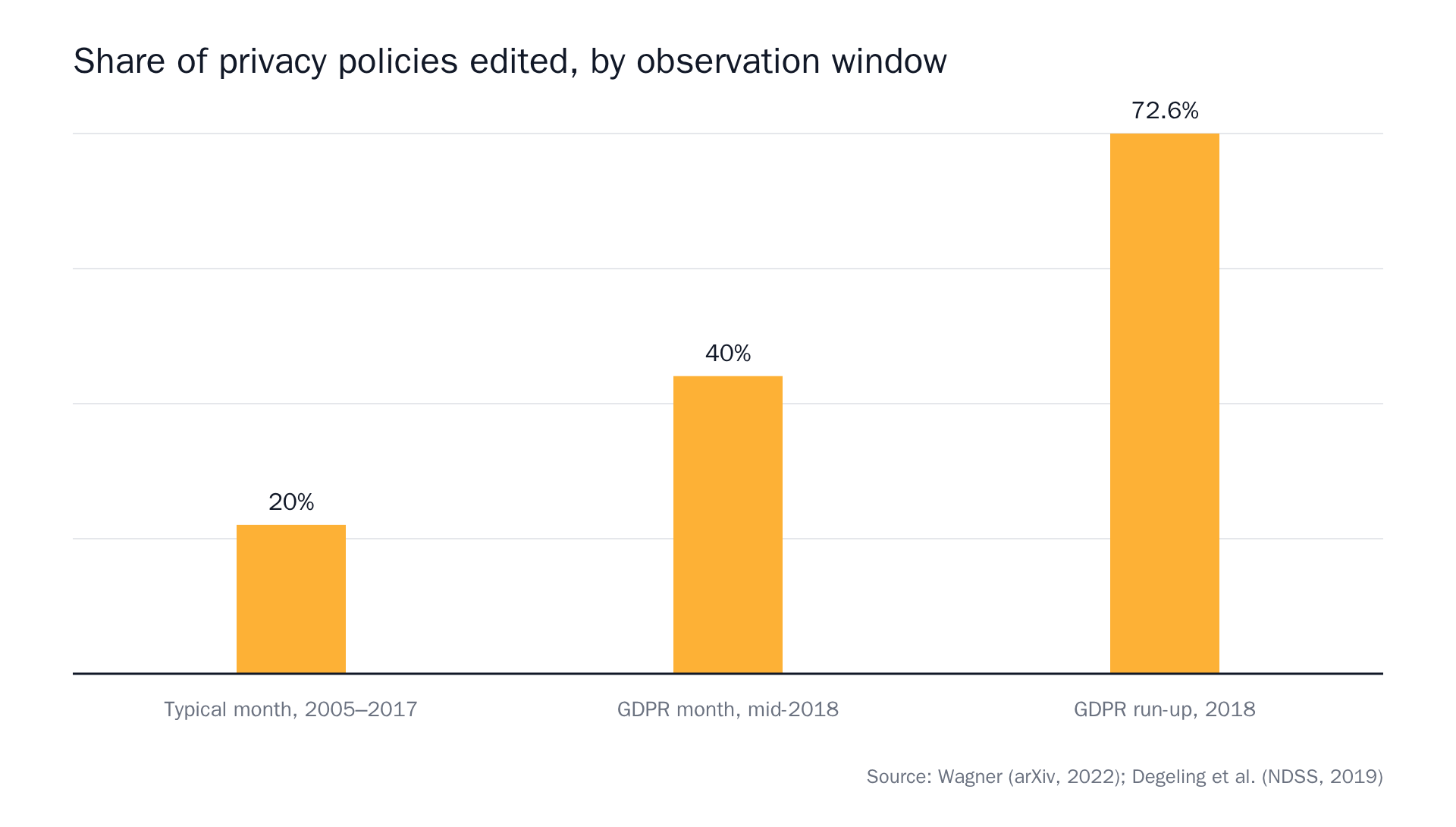 Sources: "Privacy Policies Across the Ages: Content and Readability of Privacy Policies 1996–2021"; "We Value Your Privacy … Now Take Some Cookies: Measuring the GDPR's Impact on Web Privacy."
A legal document page sits unchanged in roughly four out of five months. Checking it every 15 minutes buys you nothing except a faster route to a quota wall. Checking it daily and getting a byte-for-byte diff when the notice period drops from 30 days to 14 is the correct configuration. Cheap and correct happen to be the same thing on that page.
What we give away, and what we don't
modsignal's free plan: $0, 3 monitors, daily checks, 2 team members, exact diff and semantic tiers, no browser agent, no credit card. Checks are never metered, on any plan.
The limits, said out loud. Three monitors is fewer than Distill's five cloud monitors and fewer than PageCrawl's six. The browser agent, which launches real Chromium, dismisses cookie banners and attaches a full-page screenshot, is not on free. Daily is the fastest interval; 15-minute checks start at Pro, $25/mo.
What you don't get is a clock. We price by reach: how many pages, how fast, how many teammates. So there's no monthly check budget draining in the background, and no separate cap on how many alerts we're willing to send you. Three pages checked daily is 90 checks a month and we don't count them.
Why the alert matters more than the interval when you only have three
On a free plan the frequency question is mostly settled: once a day. What's left is whether the email was worth opening.
Our bar is that you can forward the alert, or paste it into a ticket, and nobody has to reopen the page. So an alert carries one sentence describing the change, the before/after excerpts (or a unified diff on the exact-diff tier, a line-by-line text comparison showing exactly what was added and removed), a confidence score on the semantic tier, and a link to the monitor timeline, which holds the full history and is the source of truth. Channels are copies of it.
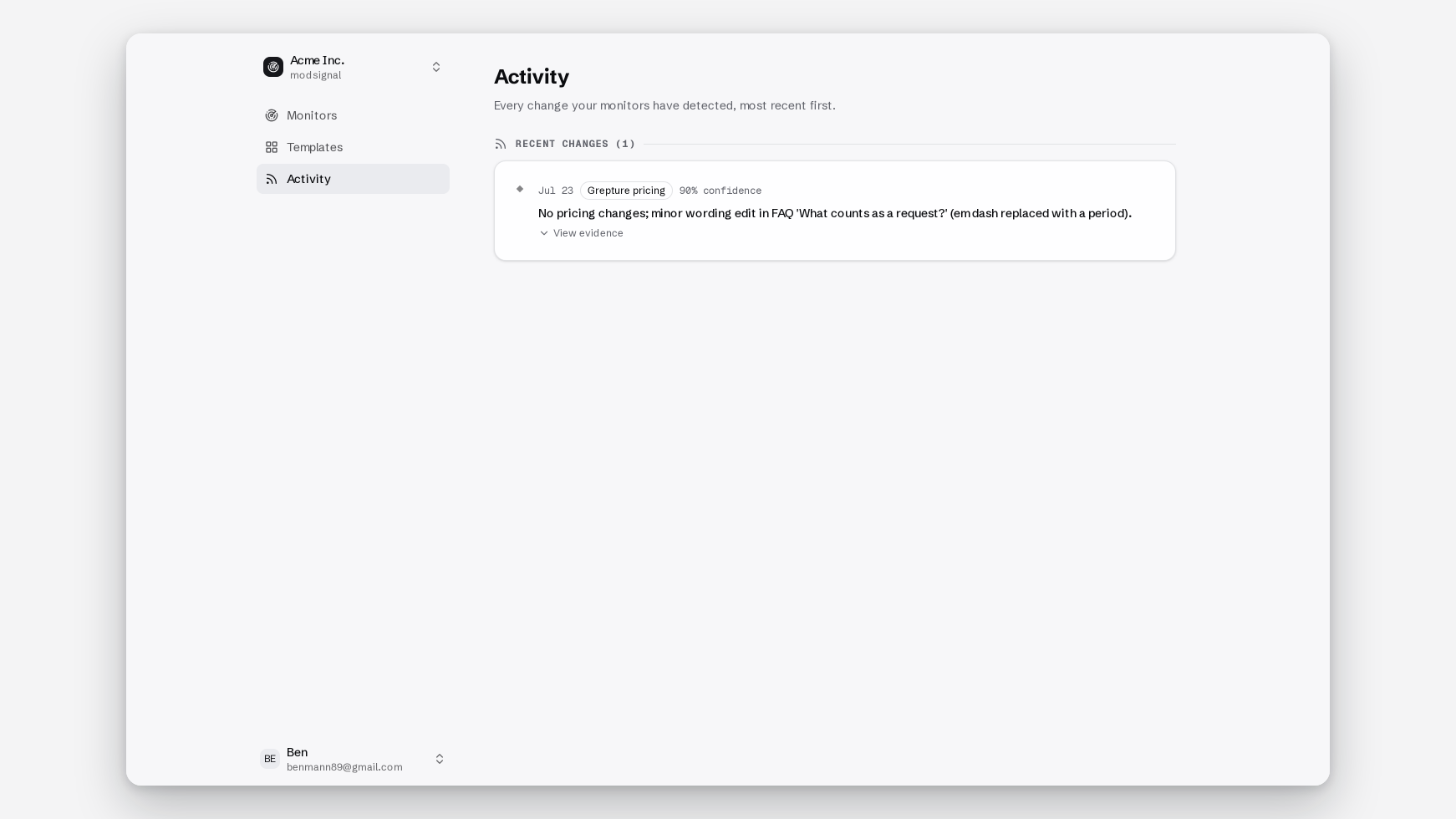
For the quiet pages that belong on a free plan (DPAs, subprocessor lists, spec pages, regulatory registers), exact diff is usually the right call. No AI involved, every character change reported. For a pricing page with A/B tests and rotating badges, use semantic and describe the change you care about. The full reasoning for each is in our writeup on choosing a check tier.
How to choose
- Want the most raw free capacity and can live with 6-hour cloud checks → Distill.io
- Comfortable with Docker, a VPS and your own maintenance → changedetection.io
- Want pixel/visual diffs and a Chrome-extension setup, and the free API matters → Visualping
- Need daily checks on 5 static pages with no quota → Wachete
- Have three quiet pages where the exact wording matters and you need evidence you can forward → us
The two-week test
Before you commit to any free plan, including ours, run one test. Set up your single quietest page — the subprocessor list, the DPA, the regulatory register. Wait two weeks. Count the emails.
The right answer is usually zero. Then check the page by hand and confirm it really didn't change, because a quota that ran out on day two looks exactly like silence.
Ours is free with no credit card: 3 monitors, daily checks, unmetered.