Google Alerts doesn't watch pages. Here's what to use for the ones it misses
Google Alerts emails you new search results, not edits to a page you already know about. How to sort your alerts, which ones to move, and how to set the moved ones up so they stay quiet.
A vendor added a subprocessor in March. You found out in June, in an audit, from a spreadsheet someone else maintained. You had a Google Alert for that vendor's name. It never fired.
The instinct is to blame the query. Add quotes, add site:vendor.com, narrow the region. It won't help, because the query was never the problem. Google Alerts emails you when new results show up in Search. An edit to a page you already know about is not a new result.
Alerts is doing its job. Its job is not your job.
So skip the question of which google alerts alternative to buy. The question is which of your alerts are actually URL-shaped, and where those should go instead. Here's the sort.
What Google Alerts actually watches
Google's own help page is unambiguous: you get emails "when new results for a topic show up in Google Search." The settings it offers are frequency, site types, language, region, number of results, and which account gets the mail.
Six knobs. Not one of them is a URL.
The troubleshooting section on that same page is about signing in with the wrong Google account, disabled alerts, a full inbox, and the spam folder. Nothing about missed edits. A missed edit isn't a bug in this product. It's outside the product.
Why an edit to a page you care about never reaches you
Three mechanical reasons, and they stack.
In-place edits aren't new results
Same URL, same <title>, same position in the index. A DPA whose notice period drops from 30 days to 14 is one number on an existing page. Nothing "shows up" in Search, so nothing triggers an alert built on things showing up. pagecrawl.io put this well in their own Google Alerts alternative writeup: the coverage is keyword-shaped, not URL-shaped. That's fair, and it's the whole story in one phrase.
Recrawl is popularity-weighted
Even if an edit did register, Google decides when to look. From the crawl budget documentation: "not every page that is crawled will necessarily be indexed," crawl demand is driven by popularity, and more popular URLs "tend to be crawled more often to keep them fresher." Google also notes its systems "want to recrawl documents frequently enough to pick up any changes," and that budget is allocated per hostname, so www.example.com and trust.example.com are separate sites competing on their own merits.
Now think about which page you care about. /legal/subprocessors is close to the least popular URL on that domain. It gets a fraction of the traffic the homepage gets, it changes twice a year, and it matters both times. Popularity-weighted recrawl is precisely backwards for that page.
Not indexed means invisible
If the page carries a noindex tag (an instruction telling search engines to leave it out of results), sits behind a login, or renders its text with JavaScript after the initial HTML arrives, Google may have nothing to alert on in the first place. Trust centers and status pages are frequent offenders on all three counts.
Sort your alerts before you pick a tool
Every roundup on this topic jumps straight to a list of nine tools. Skip that. Open your Google Alerts list and put each one in a bucket. One question decides it: do you already know the URL?
- You know the URL, and a change there has consequences. Vendor subprocessor lists, DPAs, a competitor's
/pricing, an API deprecation page, a tender portal. → Page monitor. Google Alerts structurally cannot do this. - You don't know the URL yet. You want to find pages that don't exist yet. New press coverage, a competitor's next blog post, your CEO's name in a trade publication. → Keep Google Alerts. There's nothing to replace, because there's no page to watch.
- It's a conversation, not a page. Reddit threads, Hacker News, GitHub issues, forums. → Neither. Community monitoring, covered further down.
Most people's alert lists are a mix, and the first bucket is the one quietly failing. That's the migration.
Move the URL-shaped ones to a page monitor
The mechanical difference is small and it's the whole thing: you give it a URL, it fetches that page on your schedule, and it compares the fresh page against the last snapshot it took. No index in between. No popularity weighting. In modsignal you either describe what you want in a sentence and let it configure the monitor, or you load the page in a visual picker and click the section to watch. No CSS selectors, no regex.
Three worked examples, because the tier you pick per page is most of the work.
A vendor's subprocessor page
Prompt:
Alert me if any subprocessor is added, removed, or renamed, or if a processing location changes.
Tier: exact diff. Byte-for-byte text comparison against the last snapshot, no AI call, and the evidence is a unified diff (the standard +/- format showing exactly which lines changed). On a page like this, judgment is the wrong feature. Every edit is signal, including the ones you didn't think to describe.
It's also the right tier because these pages are quiet.
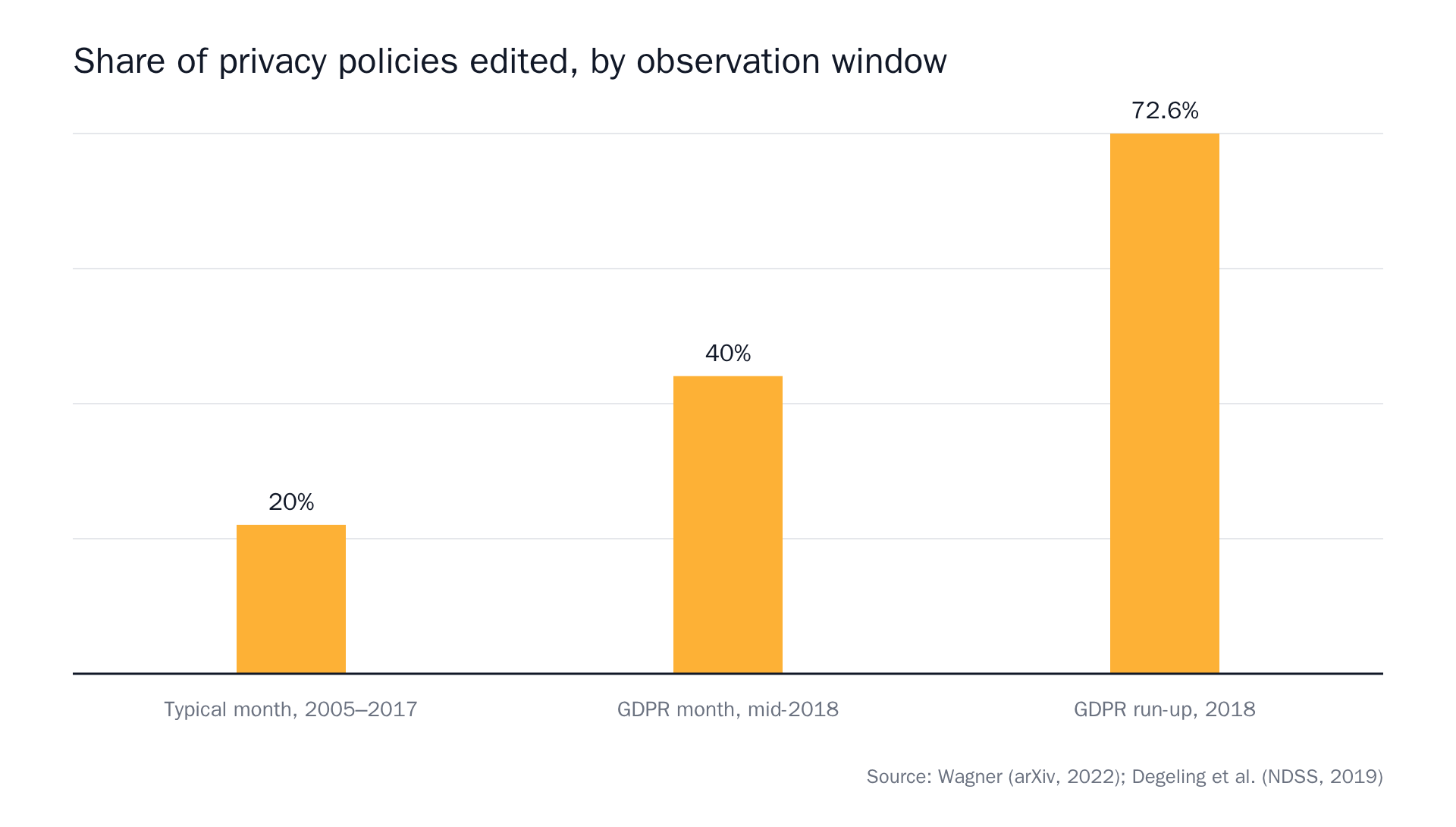 Sources: Privacy Policies Across the Ages: Content and Readability of Privacy Policies 1996–2021, We Value Your Privacy … Now Take Some Cookies: Measuring the GDPR's Impact on Web Privacy.
Four out of five months, nothing. Then a deadline lands and a lot of pages move at once. A tier with no judgment costs you almost nothing on a page like that, and it never misses the burst. If subprocessor lists are your actual job, we went deeper on the Article 28 mechanics in the guide to monitoring subprocessor lists.
A competitor's pricing page
Prompt:
Alert me if a plan is added or removed, if a listed price changes, or if a feature moves between tiers.
Tier: semantic. One model check per run reads the fresh page against the last snapshot and your prompt, and answers one question: did the described change happen? The alert carries a summary sentence, before/after excerpts, and a confidence score — the model's own uncertainty, shown rather than hidden. When Pro goes from $12 to $15 per seat, that's what you get, and you can paste it into a ticket as-is.
Pricing pages are the case where judgment earns its keep, because they're full of changes you don't care about. More on that below, and there's a longer guide on pricing-page setups if that's your bucket.
A page that won't render without JavaScript
Status pages, trust centers, marketplace review listings. Fetch the raw HTML and you get a shell. This is not an edge case anymore.
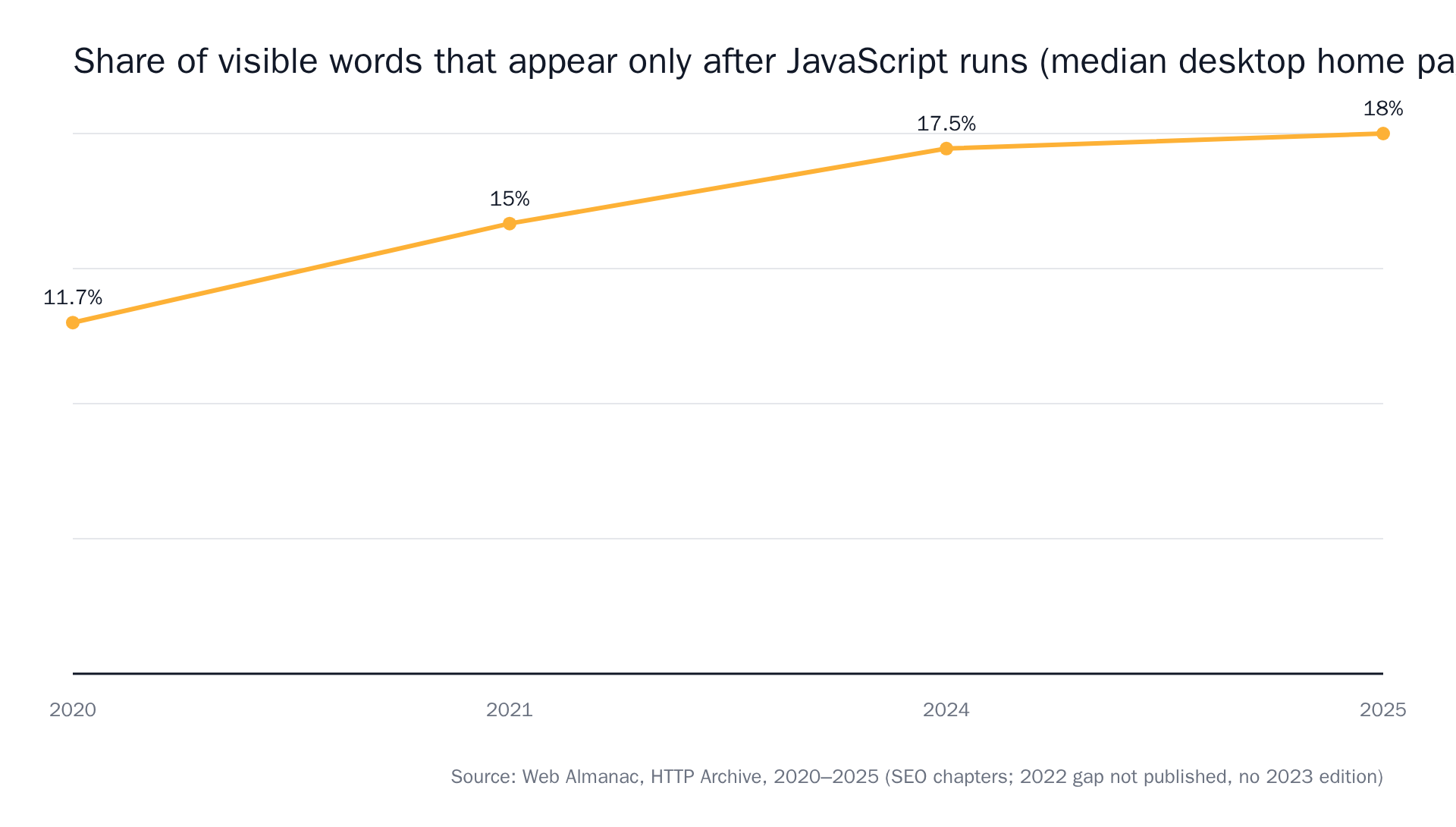 Sources: The Web Almanac by HTTP Archive, SEO 2020, 2021, 2024, 2025.
Tier: browser agent. It launches real Chromium, waits for the page to settle, dismisses the cookie banner, opens tabs and scrolls if it needs to, then applies the same semantic judgment and attaches a full-page "page as checked" screenshot.
Say the cost out loud: it's the most expensive tier per check, which is why it's a choice and not the default. Quick test before you reach for it: view the raw page source in your browser, not the inspector, and search for the text you care about. If it's there, you don't need Chromium. The tier-by-tier breakdown has the rest of the decision.
The failure that arrives right after you switch
Here's the part the other articles on this query stop just short of. You've fixed missed changes. Congratulations: you've bought a diff firehose.
Point a raw change detector at a competitor's pricing page and it will faithfully report the rotating customer logo, the "most popular" badge moving one tier over, the currency toggle defaulting differently by IP, and the A/B test that swaps two words in a headline. Thirty alerts a month, one of which mattered. Two weeks later you're filtering them into a folder, which is the same as not having them.
The fix is in the prompt. Describe the change, not the page region.
Tell me when the pricing page changes.
That's a request for every change on a noisy page. This is the one that stays quiet:
Alert me only if a plan's monthly price changes, a plan is added or removed, or the free trial length changes. Ignore customer logos, badges, testimonials, and layout changes.
Naming what to ignore does real work. If you want the full anatomy of a prompt that holds up, we wrote a whole post on the difference between "the page changed" and "the thing I care about changed".
Where the alert has to land
Google Alerts delivers to email, or to RSS. RSS arrived in 2008 and got dropped in July 2013 when Google Reader shut down. The in-product notice said "Google Reader is no longer available. To continue receiving Google Alerts, change to email delivery." Then it came back that September. Fine for a mentions feed. Not where vendor-risk work happens.
A subprocessor change needs to reach the channel where someone acts on it. modsignal sends the same evidence to every configured channel: email, Slack via incoming webhook, a signed webhook (JSON, with an X-Modsignal-Signature header carrying an HMAC-SHA256 of the timestamp and body so your endpoint can verify we sent it), and a per-team RSS 2.0 feed on a secret-token URL. Each one is independent and best-effort.
The monitor timeline is the source of truth. Channels are copies of it.
Keep Google Alerts. Seriously.
This isn't a "replace Google Alerts" post. It's free, it still works, and for the second bucket there is nothing better shaped for the job. You cannot monitor a URL that doesn't exist yet.
Two honest recommendations for the alerts that stay:
- Talkwalker Alerts if you want a more controllable version of the same job. Free, email or RSS, Boolean operators, news and blogs and forums.
- Syften if what you actually wanted was conversations: Reddit, Hacker News, GitHub, YouTube, podcasts, Bluesky, Mastodon, X. If your alert list is mostly "someone mentioned us somewhere," that's the tool, not us.
The simple rule
- Known URL, the change has consequences → page monitor.
- Unknown URL, you want discovery → Google Alerts or Talkwalker.
- Conversations, not pages → community monitoring.
- Page is quiet and every edit counts → exact diff.
- Page is noisy and one change matters → semantic.
- Text only appears after JavaScript runs → browser agent.
The bar we hold ourselves to is that you can forward the alert into a ticket and nobody reopens the page. One sentence, a before/after pair, a confidence score, a screenshot on the agent tier, and a link to the full history.
A test you can run this afternoon: take the three Google Alerts you've been ignoring longest, find the URL each one was really about, and set them up as monitors. The free plan is 3 monitors, daily checks, exact diff and semantic, two team members, no card. See which one fires first, and how long it stays quiet after that.