Get told the day the role is posted: monitoring careers pages without checking them
Boards, aggregators and Google Alerts are all downstream of a page you can watch directly. How to get one alert when a company posts a job you'd actually apply to, with the title, before/after, and a screenshot of the board as checked.
You find the role on day six. It reads like it was written for you. The recruiter already has a shortlist, and your application lands in the pile marked late.
So you set up the obvious fix: a LinkedIn alert, maybe a Google Alert on site:company.com/careers. Both are downstream of the page. They tell you what a board or an index noticed, whenever it got around to noticing it.
The careers page already knows. Here's how to make it tell you.
Why every alert you already set up is describing yesterday
If you want to get an alert when a company posts a job, the tools built for it are all working from a copy.
- LinkedIn caps you at 20 job alerts, delivered daily or weekly, by email or app notification (LinkedIn Help). No per-minute option, no per-company sentence.
- Google Alerts needs the page indexed first. Many careers boards render in JavaScript, which means Googlebot has to render before it can index. And the Indexing API doesn't rescue you: Google's Martin Splitt has been clear that pushing a URL to the API doesn't mean it's indexed right away, or at all. Discovery is not inclusion. We've written more about where Google Alerts stops being a page monitor.
- The employer's own alerts exist at some employers and not others. Workday job alerts are daily or weekly. Oracle only sends one if you subscribed, hold the right privilege, the posting visibility matches and the req is Open (Oracle docs). Greenhouse candidate-facing job alerts are still marked "coming soon" in their support docs.
The careers page is the source. Everything else is a copy with latency.
What actually breaks when you point a monitor at a careers page
The board is a widget, not a page
Most careers pages are an ATS embed: Greenhouse, Lever, Workday, Ashby. Workday careers pages render entirely in JavaScript, so a standard HTTP request returns an empty shell. Greenhouse boards are commonly iframe-embedded or API-built, with candidates redirected to boards.greenhouse.io/[company] to apply.
There's a public API (boards-api.greenhouse.io/v1/boards/{token}/jobs), and it's genuinely useful if you can get the board token. Plenty of enterprises disable the public board, use a vanity domain, or embed the whole thing in an iframe.
Run the test yourself before you configure anything. curl -s https://company.com/careers | grep -ci "engineer", or just view source in your browser (the raw source, not the inspector). Zero hits means a plain fetcher sees nothing.
We ran that check on 2026-08-19 against the blog of a company that sells job monitoring. The response body was: You need to enable JavaScript to run this app. One curl, and you can confirm it.
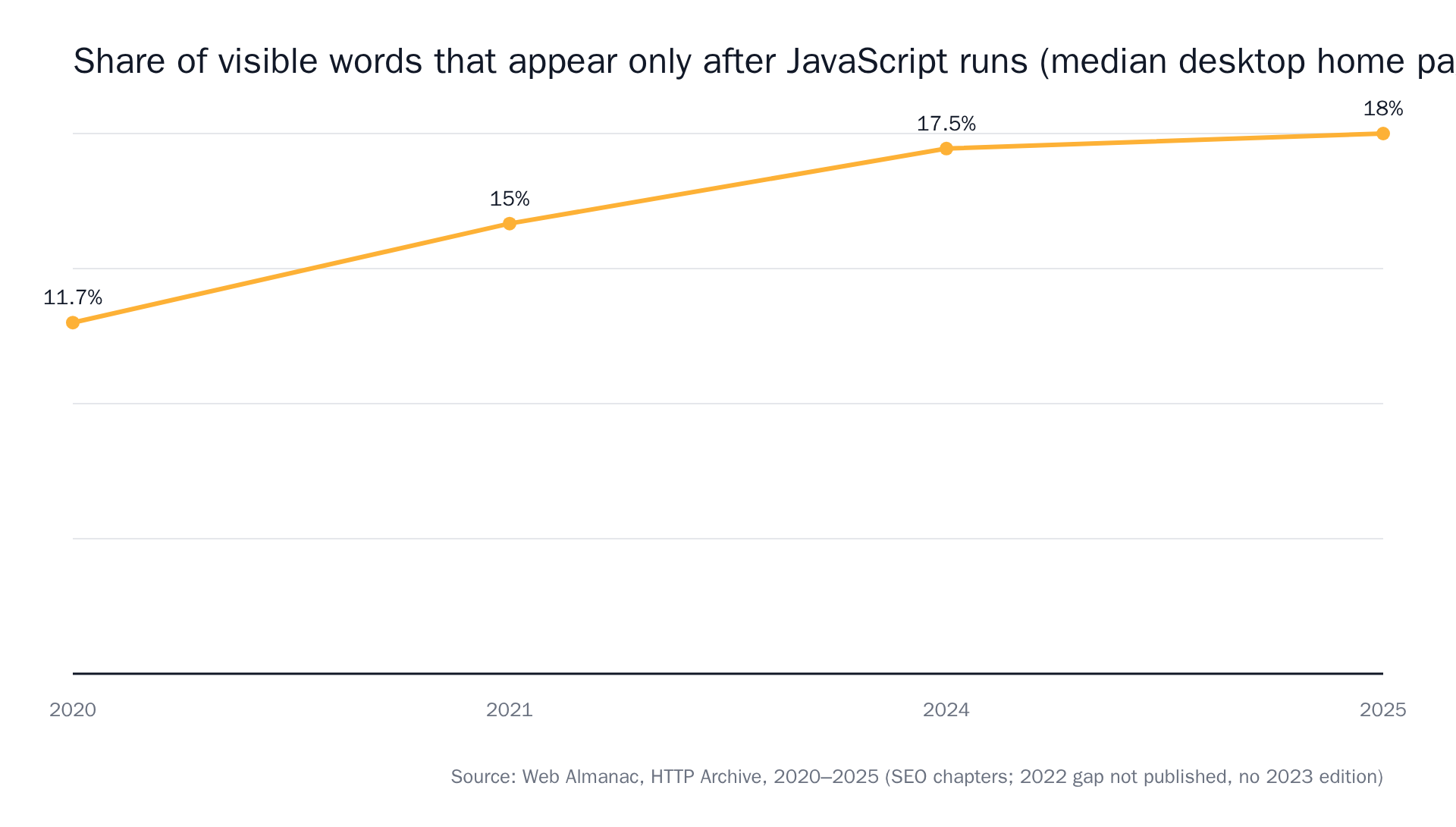 Source: Web Almanac 2020, 2021, 2024, 2025 by HTTP Archive.
The page is noisier than it looks
Careers pages move constantly without hiring anyone. Roles reshuffle by recency. Location and department filters rewrite the list. There's a "42 open roles" counter, an employee-story block, a "Life at Acme" carousel. And Greenhouse ends support for legacy custom CSS on job boards on March 13, 2026, so a wave of boards is getting re-templated on someone else's schedule.
A monitor that alerts on any change will fire for every one of those, and the one alert you wanted will be sitting under thirty you didn't.
Not every new posting is a new job
Greenhouse put ghost jobs at 18–22% of online postings in 2025. A Clarify Capital survey of 1,000 employers found roughly one in three admit posting with no current intent to hire. LiveCareer, surveying 918 HR professionals in March 2025, had 45% posting ghost jobs regularly and 48% occasionally.
Then there are reposts of the same req, which look brand new to a diff and aren't. This is exactly what judgment at check time is for.
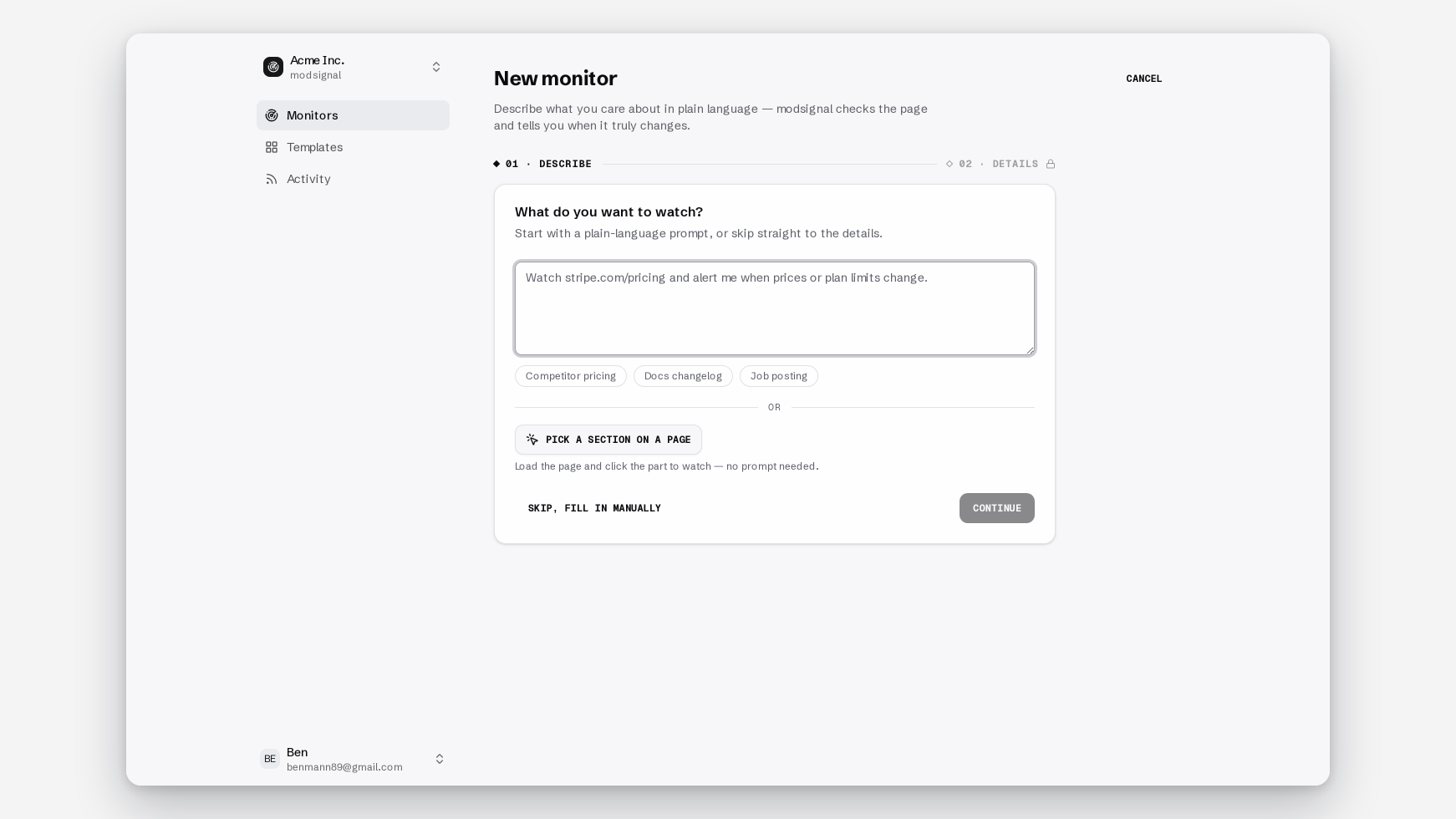
1. Write the prompt for the role, not the page
The bad version is the one everybody writes first:
Tell me when the careers page changes.
The one that works names the role, the shape, the geography, and what to ignore:
Alert me when a new full-time security or compliance role appears on the board, based in Berlin or remote within the EU. Ignore role reordering, ignore edits to existing listings, ignore contract and internship postings.
Each run, the semantic check reads the fresh page against the last snapshot plus that sentence, and answers one question: did the described change happen? A reshuffle changes the page without changing your answer, so it stays quiet. If you want the longer treatment, we have a whole guide on writing a prompt that knows the difference between "the page changed" and "the thing I care about changed".
2. One company per monitor
It's tempting to write one prompt covering your whole target list. Don't.
A monitor is one URL plus one prompt plus one tier. Fan five companies into one and the evidence collapses: you get a summary sentence that has to describe five boards, and you lose the before/after excerpt that tells you which posting appeared where.
Fifteen companies you'd genuinely say yes to is fifteen monitors. The free plan covers 3 on daily checks with no card. Pro is $25/mo for 25 monitors at 15-minute checks, which is a comfortable ceiling for a serious search.
3. Pick the tier the board deserves
Three tiers, chosen per monitor. It's a dropdown, not a migration.
Exact diff. Byte-for-byte text comparison against the last snapshot, no model call. Right for small, quiet, server-rendered boards: a 12-role startup page where every line matters. Evidence is a unified diff. Its failure mode is the busy board. Point it at 200 roles that reorder nightly and it will report all of it, correctly and uselessly.
Semantic. One model check per run, reading the fresh page against the last snapshot and your prompt. Evidence is a summary sentence, before/after excerpts, and a confidence score. That last one is the model's own uncertainty, surfaced rather than hidden. This is the default for anything with filters, counters or more than a couple dozen roles.
Browser agent. Launches real Chromium, waits for the page to settle, dismisses the cookie banner, scrolls, opens tabs, then applies the same semantic judgment. Adds a full-page "page as checked" screenshot. It's the most expensive tier per check, which is why it's a choice and not the default.
The rule:
- Roles visible in view-source, small quiet board → exact diff
- Roles visible in view-source, busy board → semantic
- View-source shows an empty shell, or the roles hide behind "Load more" → agent
Workday boards are almost always the third case. More on the mechanics in monitoring pages that don't exist until JavaScript runs them, and on the tradeoffs in choosing a check tier.
4. Set the interval to match how fast the role fills
Daily is fine for most companies. Checks are never metered, so the interval is a plan question, not a budget one.
The case for going faster is real but softer than the internet claims. jobstrack's own research says the average LinkedIn posting appears about 18 hours after the company careers page goes live, with the digest arriving the next morning. That's a vendor's number, so treat it as directional. They also cite Ashby's 2023 talent trends for the first week of a posting drawing 2–2.5x the application volume of any later week, and a GoApply study of 10,000+ job seekers correlating applications inside 24–48 hours with 2–3x more interviews.
The widely repeated "90% of interviews go to people who apply within 24 hours" line is recruiter anecdote, not a study. At least one practitioner reports the opposite from tracked applications. Being first helps. It is not the whole game.
Our recommendation: fast enough to apply the same day, not fast enough to lose your evening. Daily for the long-shot list, 15 minutes for the five companies you'd drop everything for.
5. Send it where you'll actually act on it
Every channel carries the same evidence: the sentence, the before/after or diff, the confidence score, the screenshot on agent tier, and a link to the monitor timeline, which holds the full history.
- Email, for a solo search. It's the default.
- The per-team RSS feed, if you already live in a reader. The URL contains a secret token.
- Slack, via incoming webhook, for a recruiting or sales channel.
- Signed webhooks into a tracker or CRM: JSON, with
X-Modsignal-Signature: t=<unix>,v1=HMAC-SHA256overt.bodyso you can verify it came from us. - The API at
app.modsignal.io/api/v1, with?since=<ISO>on change events, if you want to build yourself a private board.
What to do in the first hour after the alert fires
Verify it's new. Open the timeline. If the same title appeared six weeks ago and vanished, you're looking at a repost, and the tone of your outreach should reflect that.
Read the before/after excerpt rather than the whole page. It tells you the title, and usually the location and level, which is enough to decide.
Then apply, and route. Referral path first, then recruiter, then hiring manager. Attach nothing from the alert to your application. But you can forward that alert to a friend inside the company as-is, without them reopening anything.
The same monitor, a different job
The setup doesn't care why you're watching.
Four new security roles including a Head of Compliance is a roadmap leak. A first Solutions Engineer means they're moving upmarket, which is a buying signal for anyone selling to them. A sudden Tokyo posting is a market entry you'll otherwise read about in a press release next quarter. Sales teams and competitive intel read boards for the same reason job seekers do: the careers page commits before the marketing site does.
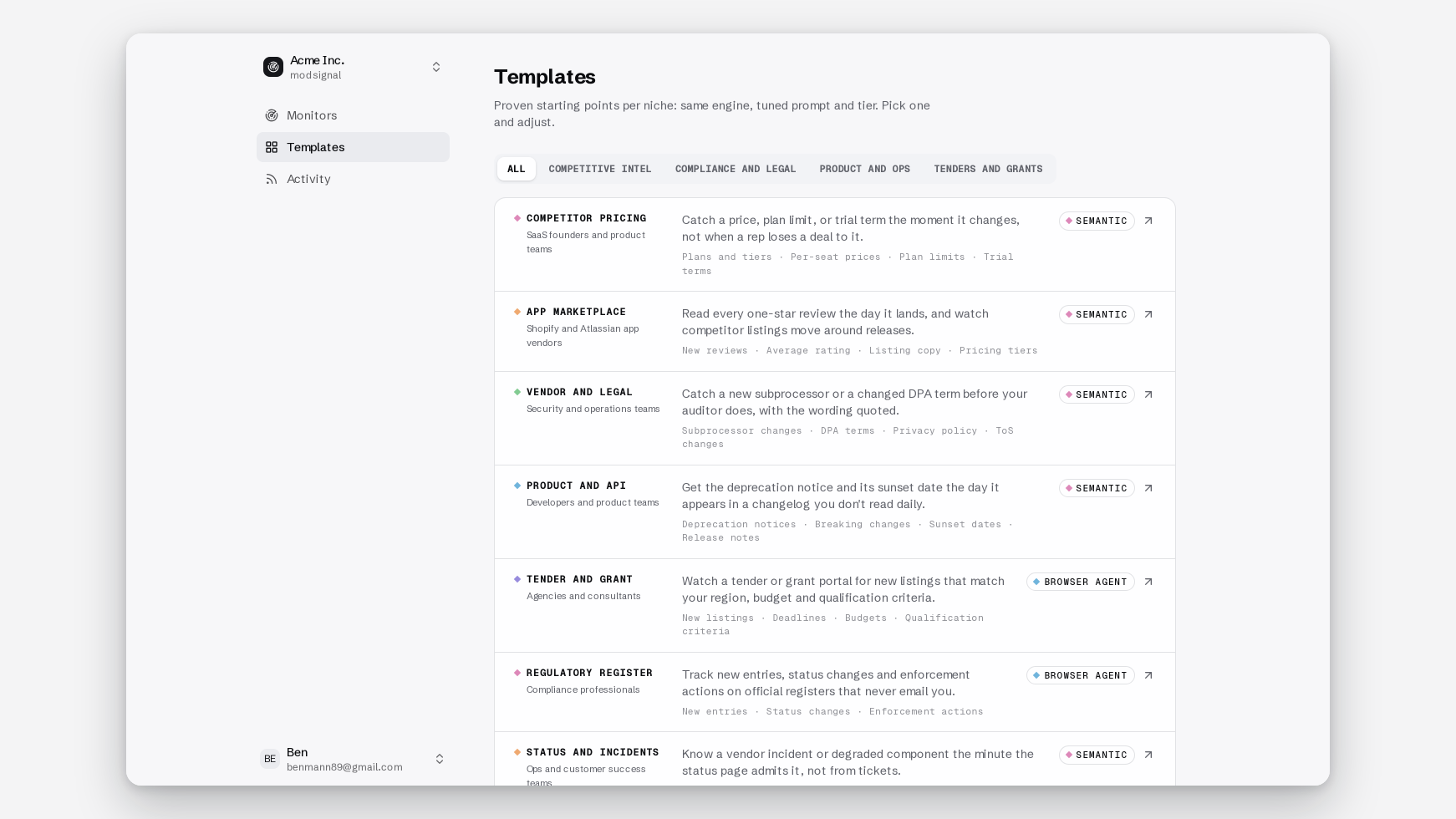
We ship hiring signals as one of 15 templates, each with a page, a prompt and a sample alert, so you can start from a working monitor rather than a blank field.
When something else is the better tool
Choose an aggregator or LinkedIn if you want breadth: every Python role in Europe, across thousands of employers you haven't named. Services like OpenJobRadar and jobstrack maintain indexes of thousands of company boards, and that's a genuinely different product. We monitor URLs you give us.
Choose the employer's own talent community where it actually works. Some send same-day mail. Sign up, and keep a monitor as the backstop.
Credit where it's due: Visualping made one-minute setup normal in this category, and their job-alert guide is a fine starting point if a highlighted screenshot is evidence enough for you.
Use us when you have a named list of companies and a specific kind of role in mind, and you want the alert to have already made the judgment.
Three monitors, daily checks, no credit card on the free plan; $25/mo for 25 companies at 15-minute checks when the list grows.
Then nothing happens, for weeks. Until the day it posts.