Deprecation notices don't email you: monitoring the changelogs your product depends on
Deprecation notices get published, not delivered. How to track API deprecation notices in vendor changelogs, deprecation tables and version policies, and catch the dates that move.
The 500s started on a Tuesday. An endpoint your billing job had called for two years came back with an error, and the error body politely mentioned that the version had been sunset. You went to the vendor's changelog and found the notice, published four months earlier, then edited six weeks after that to move the shutdown date from October to July.
The notice existed the whole time. Nobody sent it to you.
The two obvious fixes both miss this exact failure. The vendor's developer mailing list goes to the address that created the account, which at most companies is a person who has since moved teams. And the changelog RSS feed reports new entries, not edited ones. The shutdown date moved inside an entry that had already been published, so the feed had nothing new to say. If you want to track API deprecation notices reliably, you have to watch the pages, because the pages are the only place the change is guaranteed to show up.
Here's the setup that catches it.
The notice exists. The delivery is the broken part.
Deprecations get published. They rarely get delivered. Four ways the delivery breaks, all of them checkable:
- The mailing list points at the account owner. openFEC's published deprecation policy is unusually honest about the mechanics: they email registered API users who have used the endpoint being deprecated. That's a reasonable policy. It also means your notification depends on registration state, not on whether your product depends on the endpoint.
- RSS fires on new entries, not edits. A Shopify dev forum thread from 1 June 2026 flags that the changelog feed at
shopify.dev/changelog/feed.xmldoesn't distinguish first-published from later-updated, so a revised entry never resurfaces. A sunset date moving three months earlier is an edit, not an entry. - The changelog is a JavaScript app. Plenty of modern docs sites ship an empty shell in the raw HTML and fill it in client-side. A text watcher pointed at the raw response sees nothing change. Forever, and quietly.
- The dates live on the page you don't read. The blog post announces the version. The versioning reference and the deprecations table are where the actual cutoff dates are written down, and where they get rewritten.
Nobody here is acting in bad faith. These are four different ways a published fact fails to reach a human.
What the standards actually promise you
Two RFCs cover this, and both are more modest than people assume.
Sunset (RFC 8594) carries the date after which a resource is expected to stop working. Deprecation became RFC 9745 in 2025 and says a resource is deprecated, optionally with a date. Together they're the machine-readable version of "this is going away, and here's roughly when."
The catch is in RFC 9745's own security considerations: the header is a hint. It indicates deprecation without guaranteeing it. And the RFC goes further, conceding that to get the detail behind the header, developers "have to periodically inspect the home document."
The spec's own answer to discovery is: go look at the page.
There's a second limit that matters more in practice. Headers only appear on endpoints you're already calling. They tell you nothing about the endpoint your next feature will call, or the version window that just shrank, or the SDK whose extended support ends before your migration is scheduled.
Watch four pages per dependency, not one
One monitor per vendor is not enough, because the announcement and the deadline usually live on different URLs.
The changelog
Prose, dated, chronological, and noisy. New features, bug fixes, minor doc corrections, and occasionally the thing you care about. This is where announcements land first, which makes it worth watching and a poor candidate for byte-for-byte comparison.
The deprecations or sunset table
The quiet one. OpenAI's deprecations page is the model here: a table of models with shutdown dates, which is exactly the shape you want. Their 22 April 2026 batch notice covered 25+ models with hard shutdowns on 23 July and 23 October 2026, after which calls return errors. A table like that changes rarely and every change is signal.
The versioning or lifecycle policy page
The page that defines the notice window itself. Shopify's versioning docs state a new API version every three months at the start of the quarter, 5pm UTC, date-named like 2026-04, with each stable version supported for a minimum of 12 months and at least nine months of overlap. Those numbers are the basis of your migration planning. If they change, every deadline you've written into a roadmap changes with them.
The SDK release notes
Separate lifecycle, separate dates. Stripe documents extended support windows of one to two years for SDKs and runtimes, distinct from the API version itself. An app can be on a supported API version and an unsupported client library at the same time.
Four pages, one vendor. For twelve dependencies that's somewhere between 24 and 48 monitors, which sounds like a lot until you notice that most of them will never fire.
Pick the tier per page
Each of those four pages has a different noise profile, so each gets a different check tier. In modsignal that's a dropdown per monitor, not a migration, so you can change your mind after the first week.
Deprecations table and versioning policy → exact diff. Byte-for-byte text comparison against the last snapshot, no AI call, evidence is a unified diff. These pages are quiet and dense with dates. When one byte changes, you want to see which byte. A shutdown date going from 2026-10-23 to 2026-07-23 shows up as a two-character diff you can read in half a second.
Where it struggles: point exact diff at a page with a "last updated" timestamp that refreshes on every deploy and it will alert every deploy. Check the page for a rendered build ID before you commit to this tier.
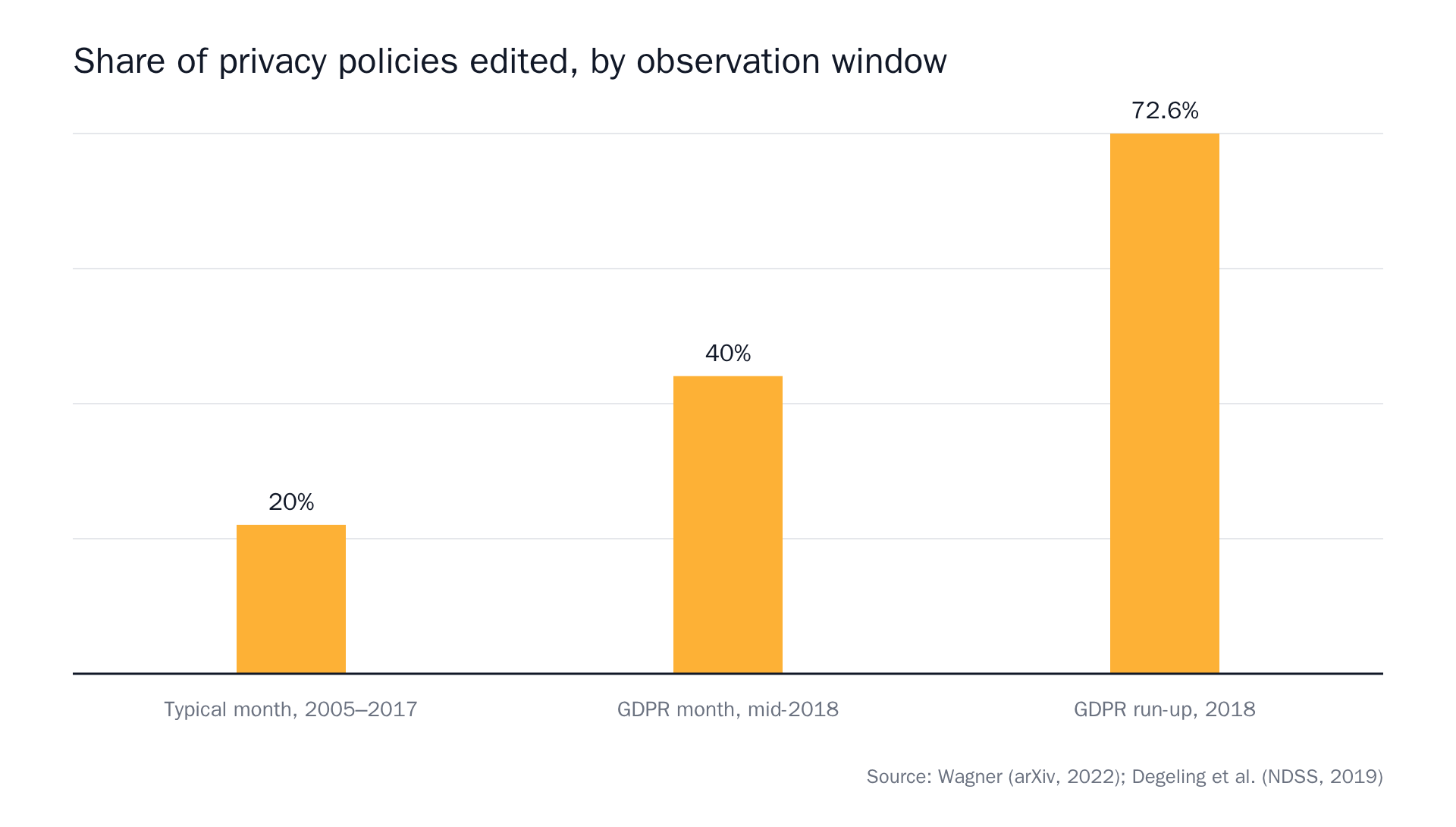 Source: Privacy Policies Across the Ages: Content and Readability of Privacy Policies 1996–2021, We Value Your Privacy … Now Take Some Cookies: Measuring the GDPR's Impact on Web Privacy.
That profile, long silence with rare sharp bursts around deadlines, is the same one a deprecations table has. It's the argument for exact diff on pages that hold dates.
Prose changelog → semantic. One model check per run reads the fresh page against the last snapshot plus your prompt, and answers one question: did the described change happen? Evidence is a summary sentence, before/after excerpts and a confidence score. This is the tier that lets a changelog entry about a new webhook event pass in silence while a shutdown date gets through.
Where it struggles: ambiguity. A changelog line reading "improved handling of legacy version requests" might be a deprecation and might be a bug fix. The confidence score is the model's own uncertainty, surfaced rather than hidden. A 62% is telling you something.
Client-side rendered docs → browser agent. Real Chromium, waits for the page to settle, dismisses cookie banners, scrolls, then applies the same semantic judgment, plus a full-page "page as checked" screenshot.
Test before you pick it. View the page source in your browser (the raw source, not the inspector, which shows you the DOM after JavaScript has run). If you search the raw source for a changelog entry you can see on screen and it isn't there, you need the agent tier. We wrote up the details in monitoring pages that don't exist until JavaScript runs them.
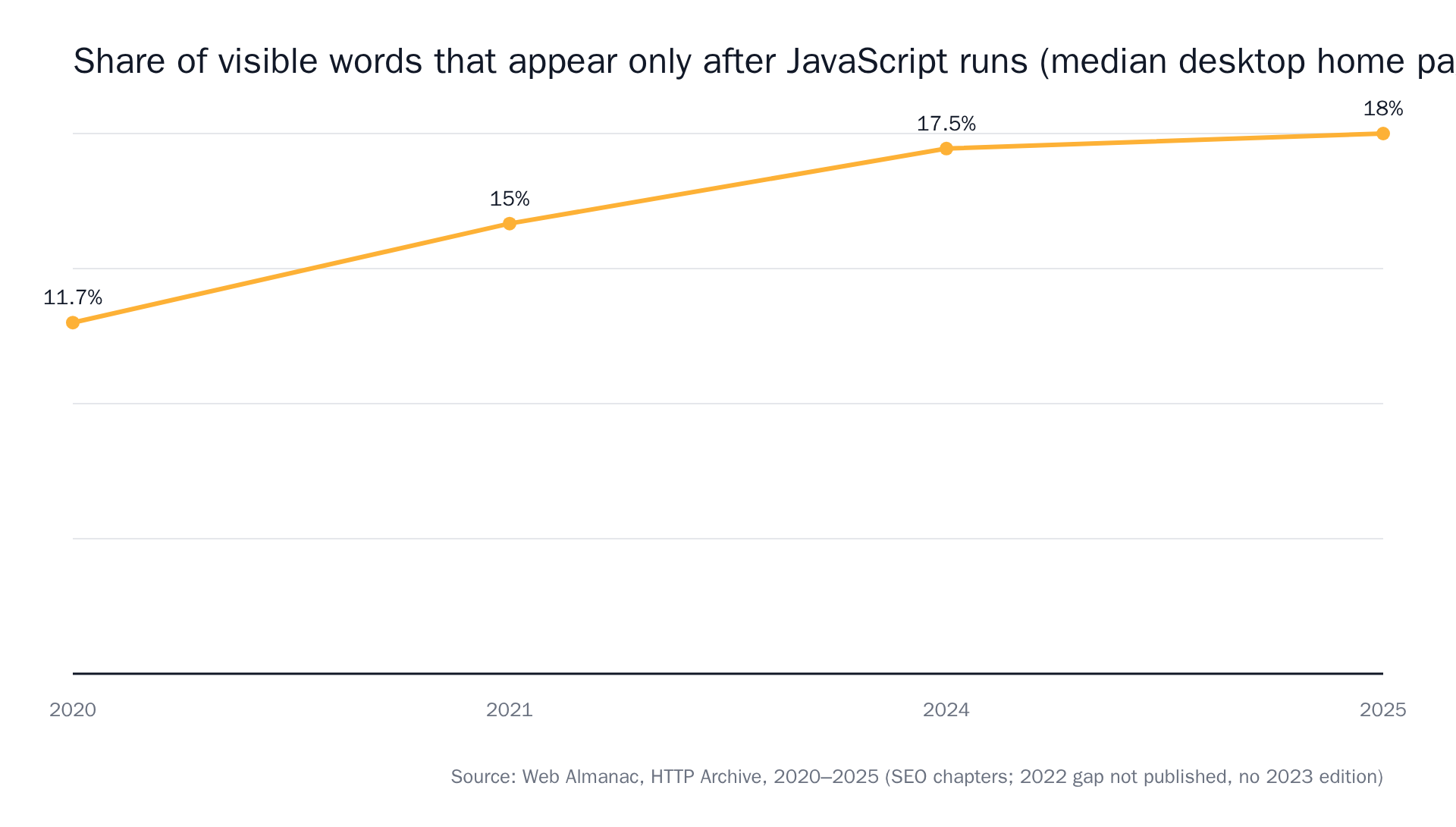 Source: The Web Almanac by HTTP Archive, SEO chapters 2020–2025.
Write the prompt for the date, not the page
The prompt is where most of the noise gets decided. This one will page you constantly:
Tell me when the changelog changes.
This one won't:
Alert me when a new deprecation or sunset is announced, when a shutdown or end-of-life date for an existing API version or model changes, or when an endpoint or field is listed as removed. Ignore new feature announcements, bug fixes, documentation edits and performance notes.
Two things make the second one work. It names the kind of change rather than a region of the page, and it says out loud what to ignore. Both matter. The exclusion list is doing as much work as the inclusion list.
One vendor per monitor. It's tempting to write one prompt covering Stripe, Shopify and Meta and point it at three URLs. You can't, and you shouldn't want to. A monitor is one URL plus one prompt plus one tier, and that constraint is what makes an alert tell you which vendor moved. There's more on phrasing in our guide to writing a monitoring prompt that knows the difference between "the page changed" and "the thing I care about changed".
What a useful deprecation alert contains
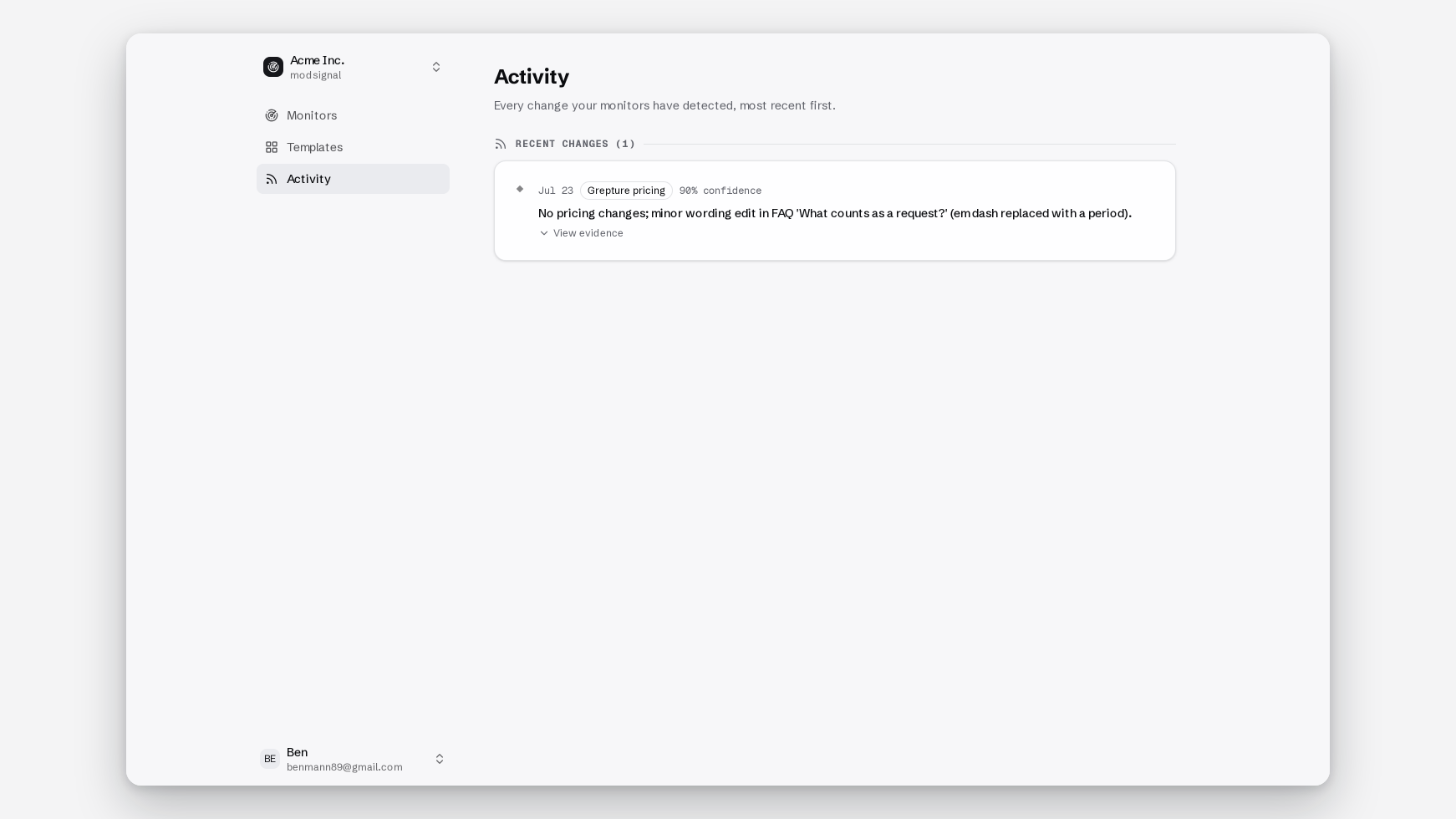
The bar we hold ourselves to: a developer should be able to paste the alert into a ticket and nobody reopens the page.
That means four things in the alert body:
- One sentence. "The shutdown date for the 2025-07 API version moved from 2026-10-23 to 2026-07-23."
- Before and after. The unified diff on exact-diff monitors, the quoted excerpts on semantic. The two dates side by side, not a screenshot to interpret.
- A confidence score, so a 58% gets a glance and a 96% gets a ticket.
- A link to the monitor timeline, which is the source of truth and holds the full change history. Channels are copies of it.
If your team runs migration work out of Slack, the same evidence goes to a Slack channel via incoming webhook, or to a signed webhook if you'd rather open the Jira ticket automatically. We wrote separately about change alerts in Slack that nobody has to reopen the page for.
When it fires: classify, date, decide
Three steps, and none of them are "read the whole changelog again."
Classify. Is this a version sunset, an endpoint removal, a field removal, or a policy change to the support window? The four have different blast radii. A removed optional field is a code search. A version sunset is a project.
Date. Write the hard cutoff into the same place you keep your other deadlines. Meta's Graph API versions expire roughly two years after the next one ships, and there's no rollback lane — an app that never called an older version can't fall back to it. Version 26.0 blocked 47 commerce endpoints on the day it landed. Dates like that don't negotiate.
Decide, on the record. Migrate now or accept and schedule. Either is fine; an undocumented decision isn't. Paste the alert and the decision into the ticket. Six months later, when someone asks when you knew, the timeline has the seen-at timestamp.
Where other approaches beat this
Page monitoring isn't the strongest tool for every version of this problem, and pretending otherwise would waste your time.
- The vendor ships an OpenAPI spec and you have CI. Diff the spec.
oasdiffor Optic in a pipeline is stricter than any prose reader, gates the merge rather than emailing you, and costs nothing. If your dependency publishes a machine-readable spec that's actually current, start there. - The endpoint is already in your production traffic. Instrument your HTTP client and read
DeprecationandSunsetoff live responses. That catches the case where a vendor never announced anything but did set the header. It's blind to everything you'll call next quarter. - All your dependencies are big names. A curated deprecation calendar covering the major APIs, with iCal sync, is a lower-effort answer for the top twenty vendors. The catalogue is the limit: if your dependency isn't in it, you're back to reading pages.
Page monitoring wins on the long tail. The regional payments provider with a hand-written HTML changelog and no feed. The internal platform team's docs site. The vendor whose OpenAPI spec lags their prose changelog by three weeks, which is most of them.
Scaling it across a dependency list
Start with one vendor and four pages. Once that's quiet for a fortnight, work down your dependency list.
Twelve dependencies at two to four pages each is 24 to 48 monitors. That fits inside Scale at $49/mo, which allows 100 monitors at checks every 5 minutes for 15 team members. Checks are never metered, so a monitor that runs every 5 minutes and finds nothing for eight months costs the same as one that fires weekly. Free covers 3 monitors on daily checks with exact diff and semantic if you want to test the shape first. Pick your single scariest dependency's deprecations table and point exact diff at it.
Most of those monitors will never send you anything. That's the point. You don't need to know that a changelog changed. You need to know that a date moved.
A deprecation notice you find in a stack trace is not a notice. It's an incident.
Start watching a changelog free. Three monitors, no credit card.