When a competitor rewrites their homepage: monitoring positioning, not pricing
Pricing changes announce themselves in numbers. Positioning changes hide in adjectives, CTAs and a logo wall. Here's how to track competitor website changes that signal a repositioning: the prompt, the check tier, and the corroboration rule.
A competitor's hero headline stops naming a workflow and starts naming an outcome. "Start free" becomes "Book a demo." The logo wall picks up three enterprise names you recognise from your own pipeline. Nothing in that list is a price change, and nobody on your team notices for six weeks. Then a rep reads their new positioning back to you off a slide in a lost-deal review.
The frustrating part is that somebody probably was monitoring that homepage. They were just monitoring it the way you monitor a pricing page: for any change, byte for byte. Homepages A/B test. They rotate testimonials. They swap seasonal art and shuffle a carousel. After the fourth alert about a stock photo, someone muted the channel, and that's where the rewrite landed.
So here's the setup that catches a repositioning.
A positioning change is not a copy change
One-sentence test: a positioning change is anything that alters who they say they're for, which problem they lead with, or which category slot they're claiming. Everything else is design.
Stratum Flow frames the comparison as five fields, which is the most useful framing we've seen on this. Watch for changes in:
- Audience. "for sales teams" → "for revenue leaders." Same product, different buyer, probably a different price point behind it.
- Lead problem. The first pain named above the fold. Moving from "manual data entry" to "forecast accuracy" is a change in who signs the cheque.
- Promised outcome. "save hours" → "increase win rates."
- Proof. SMB logos giving way to enterprise logos, or a Gartner mention appearing where a G2 badge used to be.
- Next step. The primary CTA. "Start free" → "Book a demo" is the cheapest upmarket tell in existence, and it costs their marketing team about ten minutes to ship.
Unkover calls the homepage hero the most-edited paragraph at any B2B company. That's right, and it's the problem. It gets edited constantly. Most of those edits are nothing.
What isn't a positioning change: reordered testimonials, a new photo, a "Black Friday" badge, a rotating customer carousel, a font update. If you can't map the edit onto one of the five fields, it's a copy edit. Do not page anyone for it.
Why the homepage breaks a byte-for-byte diff
Exact diff compares the fresh page's text against the last snapshot, byte for byte, with no model call. On a DPA or a subprocessor list that's exactly what you want. On a homepage it fires constantly. Worse, it sometimes can't see the thing you care about at all.
Run this test on the competitor you care about. Open the page, then open view-source (the raw HTML, not the inspector, which shows you the page after JavaScript has run) and search for the hero headline. On plenty of modern marketing sites it isn't there. The headline gets assembled client-side, so a raw HTML fetch sees a shell.
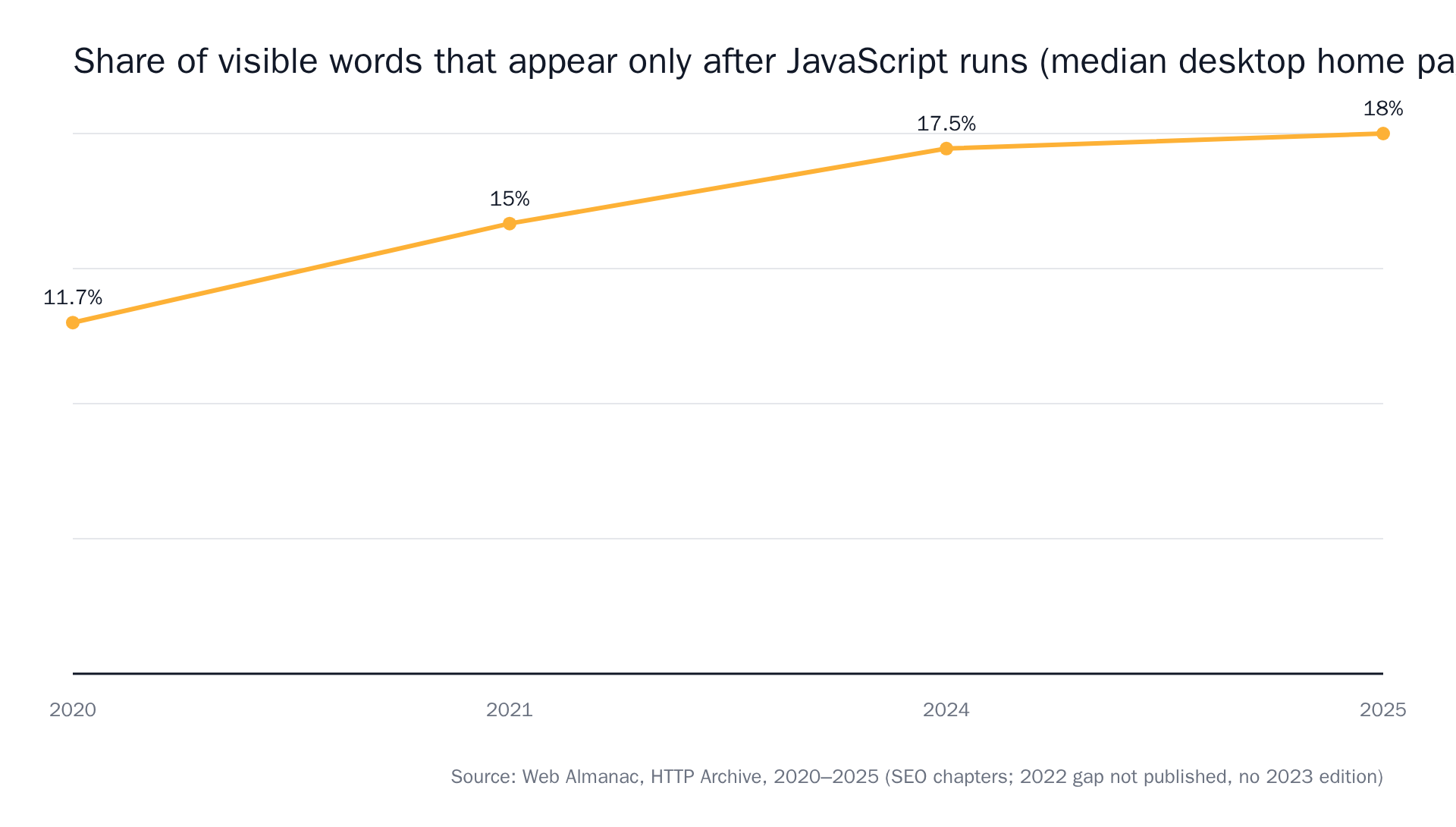 Source: HTTP Archive Web Almanac, SEO chapter.
The standard fix in most guides is to scope the monitor to a region: watch the h1, the meta description, the second h2. That works right up until the competitor ships a rebuild. Then the selectors move, the monitor either goes silent or fires on everything, and the rebuild was the event you wanted to catch. Describing the page region is not the same as describing the change. We wrote a longer piece on monitoring pages that don't exist until JavaScript runs them if you want the mechanics.
Write the prompt for the shift, not the page
In modsignal a monitor is one URL, one plain-language prompt, one check tier. The prompt is where you define the change, so define the shift.
Not this:
Tell me when the homepage changes.
This:
Alert me if the main headline or subheadline changes who this product is for, which problem it leads with, or what the primary call to action asks the visitor to do. Ignore customer logos, testimonials, images, and blog links.
The negative half of that prompt does most of the work. You are telling the check what counts as silence. Identical meaning in new words is silence. New meaning in identical layout is the alert.
One prompt per competitor, not one prompt for five. Bundled prompts produce alerts that make you open three tabs to find out which company moved, and there's more on that in our guide to writing a monitoring prompt that knows the difference between "the page changed" and "the thing I care about changed".
Pick a tier that can read meaning
Three tiers, chosen per monitor. It's a dropdown, not a migration.
- Semantic is the default for homepages. One model check per run reads the fresh page against the last snapshot plus your prompt and answers one question: did the described change happen? Evidence is a summary sentence, before/after excerpts, and a confidence score (the model's own uncertainty, surfaced rather than hidden). It ignores the carousel because the carousel isn't what you asked about.
- Browser agent when the hero only exists after JavaScript runs, or when a cookie banner covers the fold. It launches real Chromium, waits for the page to settle, dismisses the banner, scrolls, then applies the same semantic judgment and attaches a full-page "page as checked" screenshot. It's the most expensive tier per check, which is why it's a choice rather than the default.
- Exact diff is the wrong tier here, and we'd rather say so than sell you the upgrade. Keep it for quiet pages where every byte matters: DPAs, subprocessor lists, specs, regulatory registers.
If you want the full breakdown of where each one struggles, that's covered in choosing a check tier.
One legal note, since three of the top-ranking articles on this query raise it: monitoring publicly available pages is ordinary business practice. We fetch what your browser would fetch. No login walls, no restricted data.
Check daily, not every 15 minutes
A homepage rewrite takes a marketing team weeks to ship. Daily checks catch it the day it lands, and that is early enough for every decision you'll make with it.
Pricing is different. A plan drop or a trial cut from 14 days to 7 changes a live deal this afternoon, which is where 15-minute checks earn their keep. That's the setup in our guide to monitoring competitor pricing pages.
The reason you can just make that call is that we don't meter checks. You pay for reach: how many pages, how fast, how many teammates. So cadence is a judgment about the page, not a line item. Free is $0 for 3 monitors on daily checks — exactly the shape of a positioning setup.
And expect silence. Visualping, who run the largest platform in this category, published a sample of 56 million checks across three months in which roughly 1 in 9 caught a change. About 89% of checks find nothing. That's the product working.
One alert is not a repositioning
Here's the discipline that separates useful competitive intelligence from a folder of diffs: require the same direction on two pages before you escalate. Stratum Flow's version of this rule is to flag for review only when the shift shows up twice, such as the homepage plus a new case study. Use it.
A single change is usually ambiguous. A competitor removing their free plan could be an upmarket push, margin pressure, support-load cleanup, or a move to sales-led deals. You cannot tell from one diff. Homepage audience change plus public pricing disappearing behind "Contact sales" is a story. Either one alone is a Tuesday.
The arc lives in the timeline
The change that matters usually isn't visible in any single alert. Cotera describes a competitor moving from "Sales automation" to "Revenue operations" to "AI-powered revenue intelligence" across 18 months. Nobody caught that arc in one notification. It's three alerts, nine months apart, that only mean something when you read them next to each other.
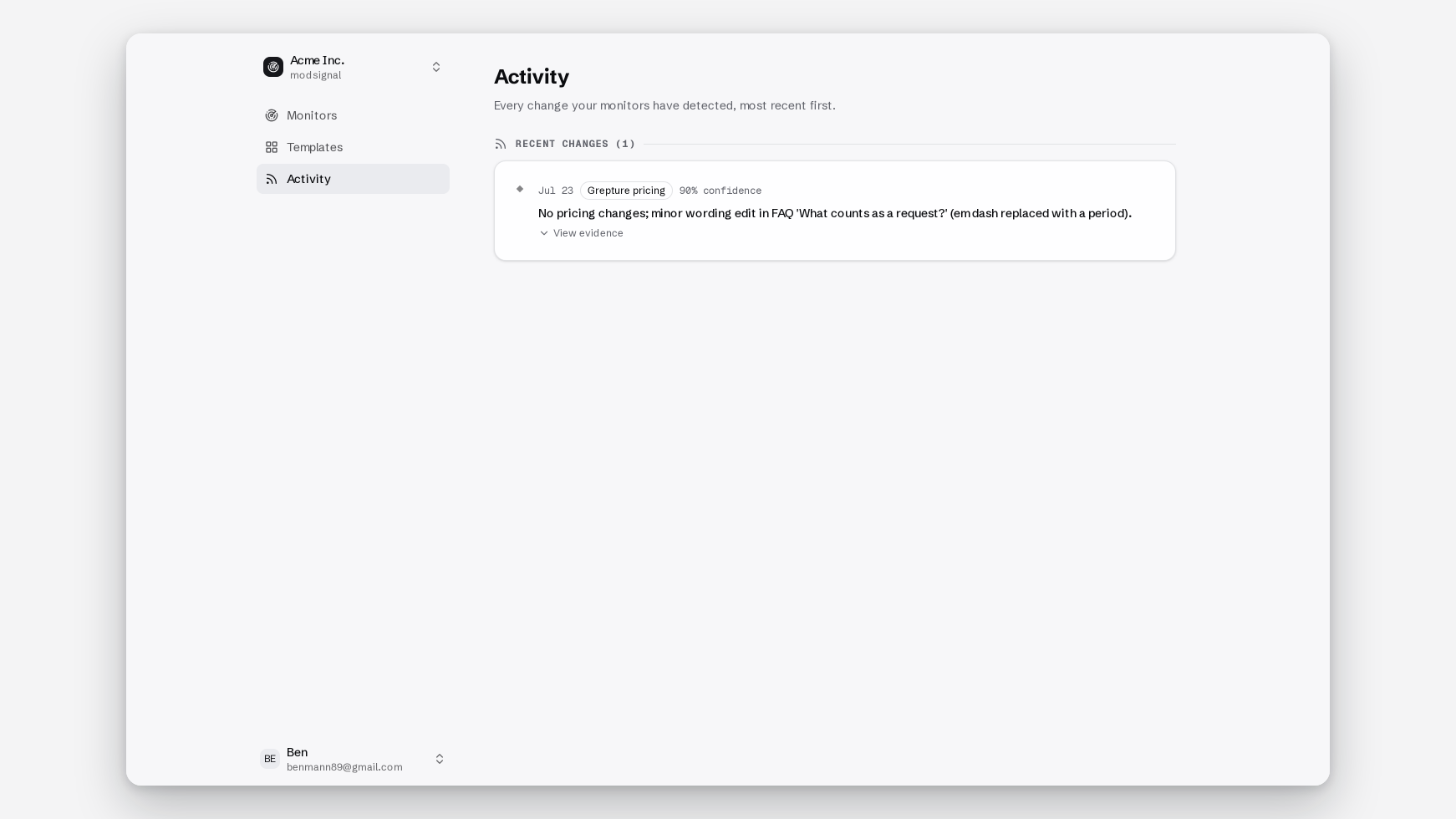
That's why every monitor has a timeline holding its full change history, and why the timeline is the source of truth. Slack, email, webhooks and the RSS feed are copies of it.
The hour after it fires
- Classify. Copy edit, segment test, or repositioning. Use the five fields. If it doesn't map, close it.
- Corroborate. Open the second page. Pricing visibility, the comparison page, the careers page. Same direction, or not.
- Forward. Our bar is that you can paste the alert into a battlecard ticket without anyone reopening the page: one sentence, before/after excerpts, a confidence percentage, and the screenshot on agent tier.
- Route. Decide this before you switch the alerts on, not after. Positioning goes to product marketing. Pricing goes to finance and sales leadership. Hiring clusters go to competitive ops. Gathering is easy; the place most CI programs stall is acting.
Where this stops being enough
A website tells you what a company claims, not what it closed.
Crayon's 2026 survey found 57.5% of teams saying more of their deals are competitive than a year ago, with only 16% saying it eased, and seven in ten reporting that at least half their opportunities are now competitive. Average rep readiness for those deals: 6.3 out of 10. The same survey found something that cuts against this whole article. For years the competitor's own website was the source teams leaned on most; in 2026 it was overtaken by intel teams already hold internally: employee knowledge, internal docs, call recordings.
So if what you need is win-loss analysis, battlecard distribution and rep enablement, buy a CI suite. Crayon and Klue do that job properly and we don't do it at all. We watch pages, quietly, and hand you evidence you can forward.
The monitors that earn their keep here are the ones that say nothing for four months and then fire once, with a before/after showing "for sales teams" turned into "for revenue leaders." One alert, arriving the week it happened instead of six weeks later in a lost-deal review.
Three monitors on the free plan is enough for one competitor's homepage, pricing page and comparison page, daily checks, no credit card. The competitor product and repositioning template ships with the page, the prompt and a sample alert if you'd rather start from something that already works.