Moving your monitors off Visualping: what to re-check before you switch anything on
A migration checklist for anyone shopping for a Visualping alternative. Which pages to move first, what to rewrite instead of copy, and the four settings that quietly decide whether your new monitors stay quiet.
The usual way this goes: you export a list of 40 Visualping monitors, recreate all 40 somewhere else in an afternoon, turn them on, and by Thursday you've muted the whole channel. The tool changed. The noise didn't.
That's because most of what makes a page monitor useful doesn't live in the URL. It lives in the decision about what counts as a change, and that decision doesn't survive a copy-paste. If you're shopping for a Visualping alternative, the migration is a good excuse to re-check work you probably did once, in a hurry, eighteen months ago.
Here's what to look at before you switch anything on.
First, credit where it's due
Visualping is the biggest name in page monitoring and has been for years. Visual diff is a genuinely good default when you don't know what you're looking for: point it at a page, get a picture with red boxes on it, done. If your job is "tell me if anything on this page moved," it does that well and there's no reason to leave.
The reason people do leave is usually one of two things. Either the metered check quota turned "watch this every 5 minutes" into a budgeting exercise, or the alerts arrive correctly and are still useless, because a red box around a rotating logo carousel is technically an accurate answer to the wrong question.
Comparison numbers on plans and gating move around; we keep ours on the Visualping alternative page with a date on them, and you should check their pricing page for current figures rather than trusting anyone's screenshot, including ours.
The rest of this is about the second problem.
1. Sort your existing monitors into three piles
Don't migrate a list. Migrate three lists.
Open your Visualping dashboard and go through every monitor asking one question: when this last fired, did I do anything?
- Fired and I acted. Pricing changes, a subprocessor added, a role posted, a deprecation notice. These are the monitors worth real care. Usually a third of the list at most.
- Fired and I glanced and closed it. The noisy ones. Marketing pages, homepages with testimonial carousels, anything with a "trusted by" strip.
- Never fired, or I don't remember why I made it. Dead weight. A URL you were curious about in March.
Move pile one first, rewrite pile two, and leave pile three behind. It's a cleanup, not an archaeology project. The average migration we see is a list of 30-something monitors that becomes 12 that matter, and nobody misses the other 18.
2. Rewrite the region as a sentence
This is the actual work, and it's the part that doesn't transfer.
A visual or element-based monitor is configured by where: a selected region, a CSS selector, an element on the page. modsignal is configured by what: one plain-language sentence describing the change you care about. There's no mechanical conversion between the two, because they're answers to different questions.
So take each monitor in pile one and write down what you were actually hoping to be told. Not the region. The change.
Region-shaped, which is what you have now:
Watch the pricing table on acme.com/pricing
Change-shaped, which is what you want:
Alert me if any plan's monthly price changes, if a plan is added or removed, or if the free trial length changes. Ignore testimonials, logos, badges, and currency toggles.
The second one is longer and that's fine. The important half is the second sentence: naming what to ignore is how you buy silence in advance. We wrote a longer piece on how to write a monitoring prompt that knows the difference between "the page changed" and "the thing I care about changed" if you want the full pattern library, but the short version is: one page, one prompt, one kind of change. Don't write one prompt covering five competitors.
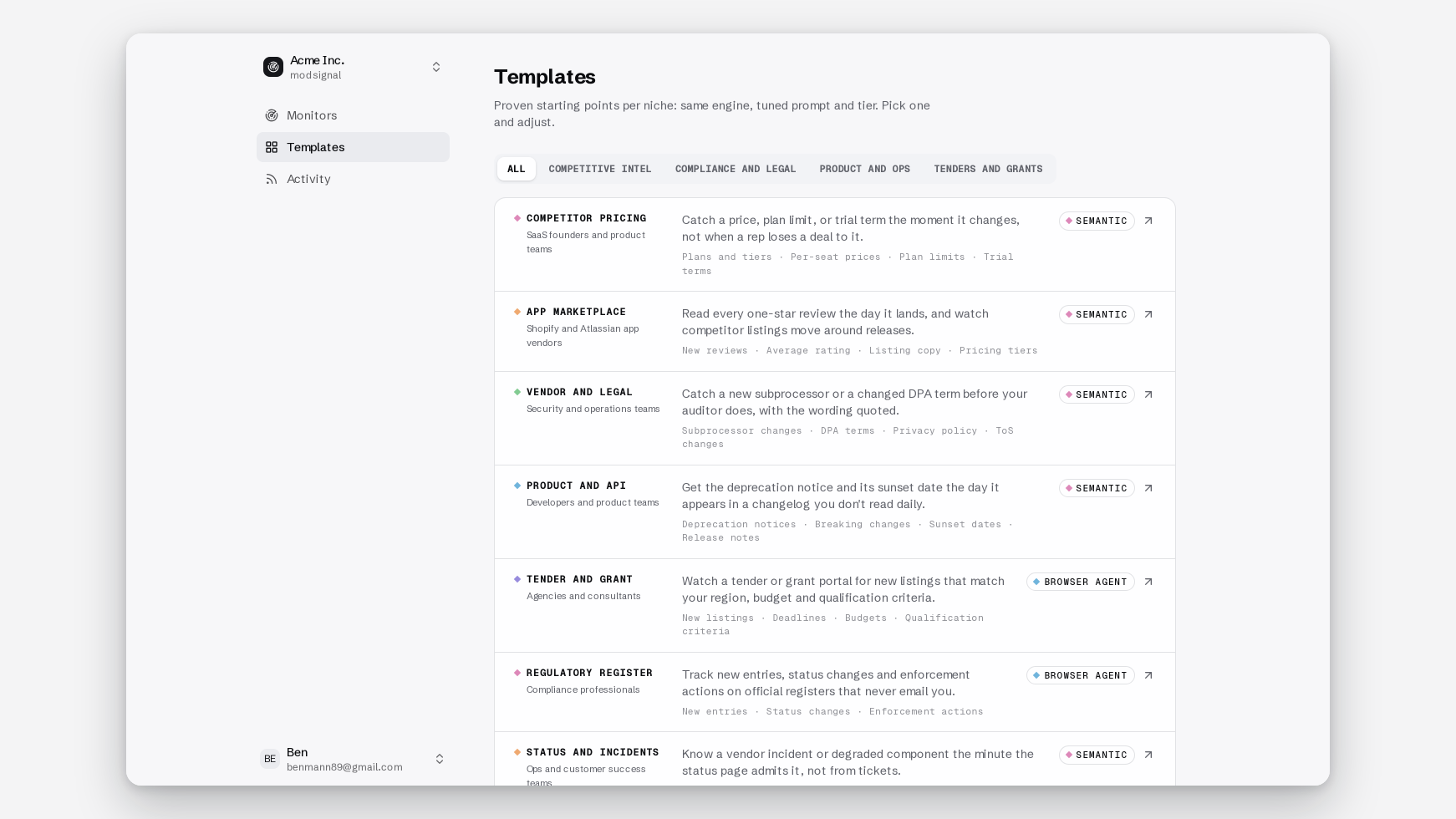
If you'd rather not start from a blank box, the template gallery ships 15 of these with the prompt already written — competitor pricing, subprocessor lists, marketplace reviews, tenders, deprecations. Each one is editable after you clone it.
3. Re-check the tier per page, not per account
In modsignal, the check tier is a per-monitor dropdown, not a plan you're locked into. Three options, and the cheapest one is the right answer for a good chunk of your list.
- Exact diff. Byte-for-byte text comparison against the last snapshot. No model call. Evidence is a unified diff, the plus/minus format you've seen in a pull request, showing exactly which lines were added and removed. Right for quiet pages where every change matters: DPAs, subprocessor lists, API specs, regulatory registers.
- Semantic. One model check per run reads the fresh page against the last snapshot plus your prompt and answers only one question: did the described change happen? Evidence is a summary sentence, before/after excerpts, and a confidence score. Right for pages that change constantly but only occasionally meaningfully.
- Browser agent. Launches real Chromium, waits for the page to settle, dismisses the cookie banner, scrolls, opens tabs, then applies the same semantic judgment and attaches a full-page "page as checked" screenshot. Right for pages that are empty until JavaScript fills them in.
Here's the re-check that matters. Anything you were watching on Visualping because the text diff kept missing it is a browser-agent candidate. That's usually a client-side-rendered page where the raw HTML is a shell and the content arrives after the scripts run.
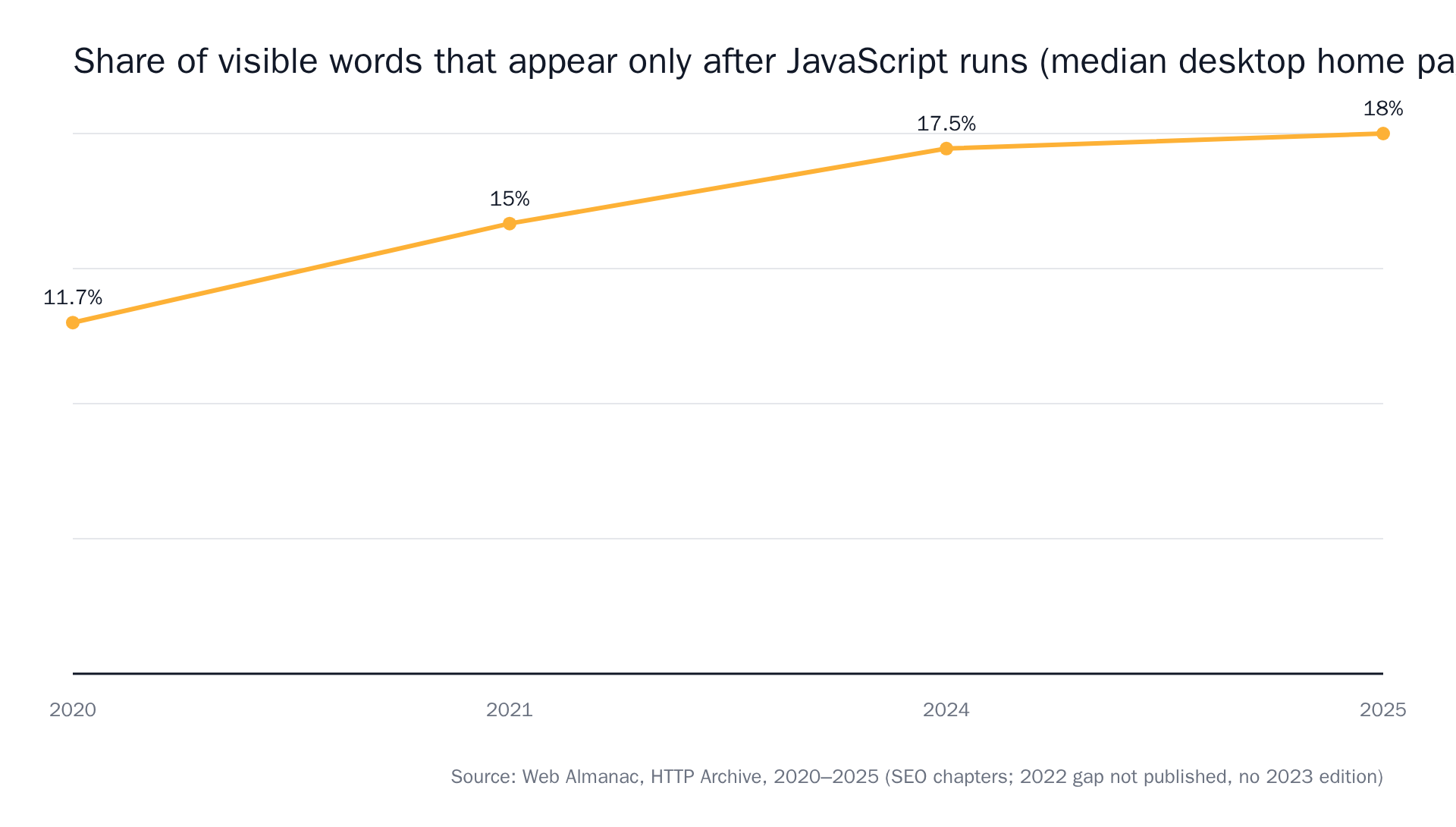 Source: The Web Almanac by HTTP Archive.
You can test it yourself in ten seconds: view the raw page source in your browser (View Source, not the inspector) and Ctrl-F for a phrase you can see on screen. Not there? Browser agent. There? Don't pay for Chromium.
And the reverse: anything legal or regulatory that you had on a visual diff should probably go to exact diff, not semantic. Policy pages sit still for months and then move sharply, so a byte-for-byte comparison gives you near-zero false positives and catches the one comma that changes a notice period from 30 days to 14.
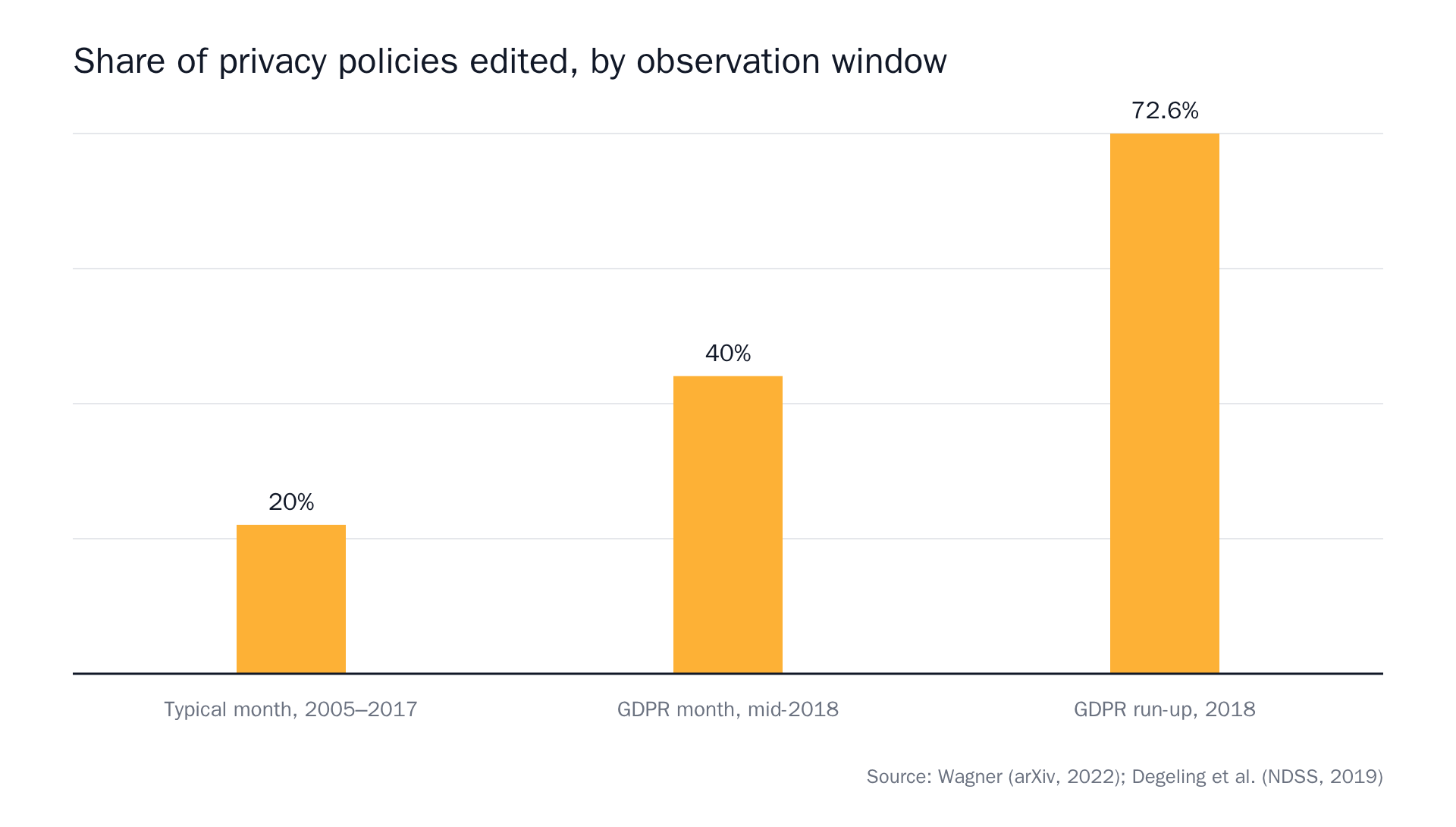 Sources: Privacy Policies Across the Ages, We Value Your Privacy … Now Take Some Cookies.
Full mechanics of each tier and where each one falls over are in the check tier explainer. Nothing about a tier choice is permanent. It's a dropdown, not a migration.
4. Re-check the interval you were actually paying for
Metered tools push you into a specific habit: you slow down the check frequency to conserve quota. Six-hourly on a page you'd rather see hourly, because 40 monitors times 24 checks a day adds up against a monthly allowance.
modsignal prices by reach, not by check. How many pages, how fast, how many teammates. Checks are never metered.
- Free: 3 monitors, daily checks, 2 members, exact diff and semantic, no card
- Pro $25/mo: 25 monitors, every 15 min, 5 members
- Scale $49/mo: 100 monitors, every 5 min, 15 members
- Business $99/mo: 500 monitors, every 2 min, 100 members
All paid plans include all three tiers, including the browser agent. So when you rebuild a monitor, set the interval to what the page deserves rather than what your old quota allowed. A competitor pricing page on Scale can sit at 5 minutes and cost the same as one at daily.
Higher is not better, though. A subprocessor list that changes four times a year does not need a 2-minute check; daily is fine and the timeline will look identical.
5. Re-check who gets told, and where
On the old tool you may have had alerts landing in one person's inbox because the Slack integration sat behind a higher tier. Worth redoing from scratch.
Channels live in Settings → Notifications, are configured per team, and every channel gets the same evidence. They're independent and best-effort, so one failing doesn't take down the others.
- Email. The default. If no email channel is configured, alerts go to every team member.
- Slack. An incoming webhook. The alert arrives with the sentence, the before/after, and the confidence score in the message body. The goal is that nobody has to reopen the page to know what happened.
- Signed webhooks. JSON,
typeofchange_eventsormonitor_paused, plusrun_completedheartbeats so you can tell "nothing changed" apart from "the monitor died." Signature header isX-Modsignal-Signature: t=<unix>,v1=<HMAC-SHA256 of "t.body">. - RSS. A per-team RSS 2.0 feed with a secret token in the URL. Good for people who won't join another Slack channel.
If you were driving Visualping through its API, the equivalent is a bearer key from Settings → API (owners and admins, scoped to one team, shown once, stored hashed). 120 requests per minute, 429 with Retry-After beyond that. tier is diff | ai | agent, and change events come back with summary, evidence.before, evidence.after, confidence and seen_at. Add ?since=<ISO> if you're polling.
6. Run both for a week before you turn the old one off
Don't cut over on faith. Rebuild pile one, leave Visualping running, and compare for seven days.
Three things to watch for:
- Did modsignal miss something Visualping caught? Usually a prompt too narrow. Widen it.
- Did modsignal fire on something you didn't care about? Usually a prompt missing its ignore list. Add the ignore clause.
- Did Visualping fire on things modsignal stayed quiet for? That's the point. Check the timeline to confirm the change really was cosmetic, then stop worrying about it.
The monitor timeline is the source of truth here: every check, every change event, full history. Channels are copies of it. If the two tools disagree, the timeline settles it.
Expand the event in question and you get the sentence, the before and after excerpts, and the confidence score in one place. That's usually enough to close the argument in a minute, without opening the page in a third tab.
Free covers 3 monitors at daily checks with no card, which is enough to shadow your three most important pages for a week before you spend $25.
Choose Visualping if
We'd rather say this out loud than have you find out in week two.
- You want a visual record of the whole page and the picture is the deliverable. A red-boxed screenshot is a nicer artifact for some workflows than a sentence plus a diff.
- You genuinely don't know what you're watching for. A prompt requires a hypothesis. Visual diff doesn't.
- Your list is mostly layout and design changes rather than content changes. We read the page, not the pixels, so a button moving 40px left is invisible to us.
- You're already happy. Migration has a cost and "the alerts are fine" is a complete answer.
If you're leaving because the alerts are accurate and still don't tell you anything, that's the case we built for. One sentence, before and after, a confidence score, a screenshot on the agent tier, and a link to the timeline. The bar we hold ourselves to: you can forward it into a ticket without anyone reopening the page.
Twelve good monitors that stay quiet beat forty that don't. Start with three on the free plan and see which week feels better.