The page has no RSS feed. Make one out of what changes on it.
No feed on the page? Find the hidden one first. If there really isn't one, stop trying to extract items. Turn each real change into a feed entry, with evidence attached.
You go looking for a feed on a vendor's DPA page. No orange icon, no <link rel="alternate">, nothing. So you search for how to build an rss feed for a website that doesn't have one, and every guide and every tool wants the same thing from you: load the page, click "the repeating block," pick the title, pick the link, pick the date.
A DPA has one of everything. There is no repeating block. Point an item extractor at it and you get a valid feed with zero items, forever.
That's the gap in every article on this topic. There are two shapes of feedless page, and the internet only writes about one of them.
First, spend five minutes proving there's no feed
Plenty of sites ship a feed and never link to it. Check before you build anything.
- Read the raw source. View source (not the inspector — the raw source) and search for
application/rss+xmlorapplication/atom+xml. If it's there, you're done. - Try the usual paths.
/feed,/rss,/rss.xmlcover WordPress and most CMSes./feed.xml,/atom.xmland/index.xmlcover Jekyll, Hugo and Astro. Blogger uses/feeds/posts/default, Ghost uses/rss/, Squarespace answers to?format=rss, Wix to/blog-feed.xml, Shopify to/blogs/news.atom. - Try the platform trick. Any GitHub repo publishes
github.com/owner/repo/releases.atom. Any subreddit publishesreddit.com/r/<sub>/.rss. - Fall back to
/sitemap.xml. Not a feed, but it's dated and machine-readable, and it exists on sites that never had an index page at all.
If one of those works, stop reading and subscribe. A feed the publisher maintains will always beat a feed you maintain.
Two shapes of page with no feed
Once you've established there's genuinely nothing, the next question decides which tool you need. Skip the question of which generator is best. Ask what an item on this page actually is.
On a list-shaped page, the item is a post
A blog index, a careers page, a press room, a listings grid. Repeating blocks with a title, a link and usually a date. Something new appears at the top; you want an entry for it.
This is the job item extractors were built for, and they're good at it. If you'll self-host, RSS-Bridge describes itself as "the RSS feed for websites missing it," runs on PHP, ships dozens of prebuilt bridges and sits around 9.2k GitHub stars with a public-domain source. RSSHub is the bigger hammer: 41k-plus stars, over a thousand routes, Docker-deployable. If you won't run a server, RSS.app and Inoreader will do the point-and-click version.
We don't do title-and-link extraction. For list-shaped pages, one of those is the better tool, and we'd rather say so than sell you around it.
On a state-shaped page, the item is the change
A pricing page. A DPA. A subprocessor table. A spec, a status page, a tender register, an API deprecation notice.
These pages don't publish items. They hold a current state, and occasionally that state is different. There is nothing to extract because nothing repeats. What you actually want an entry for is the moment the Standard plan moved from $12 to $15 per seat, or a new subprocessor appeared in row nine of a table that has looked identical since March.
The change is the item.
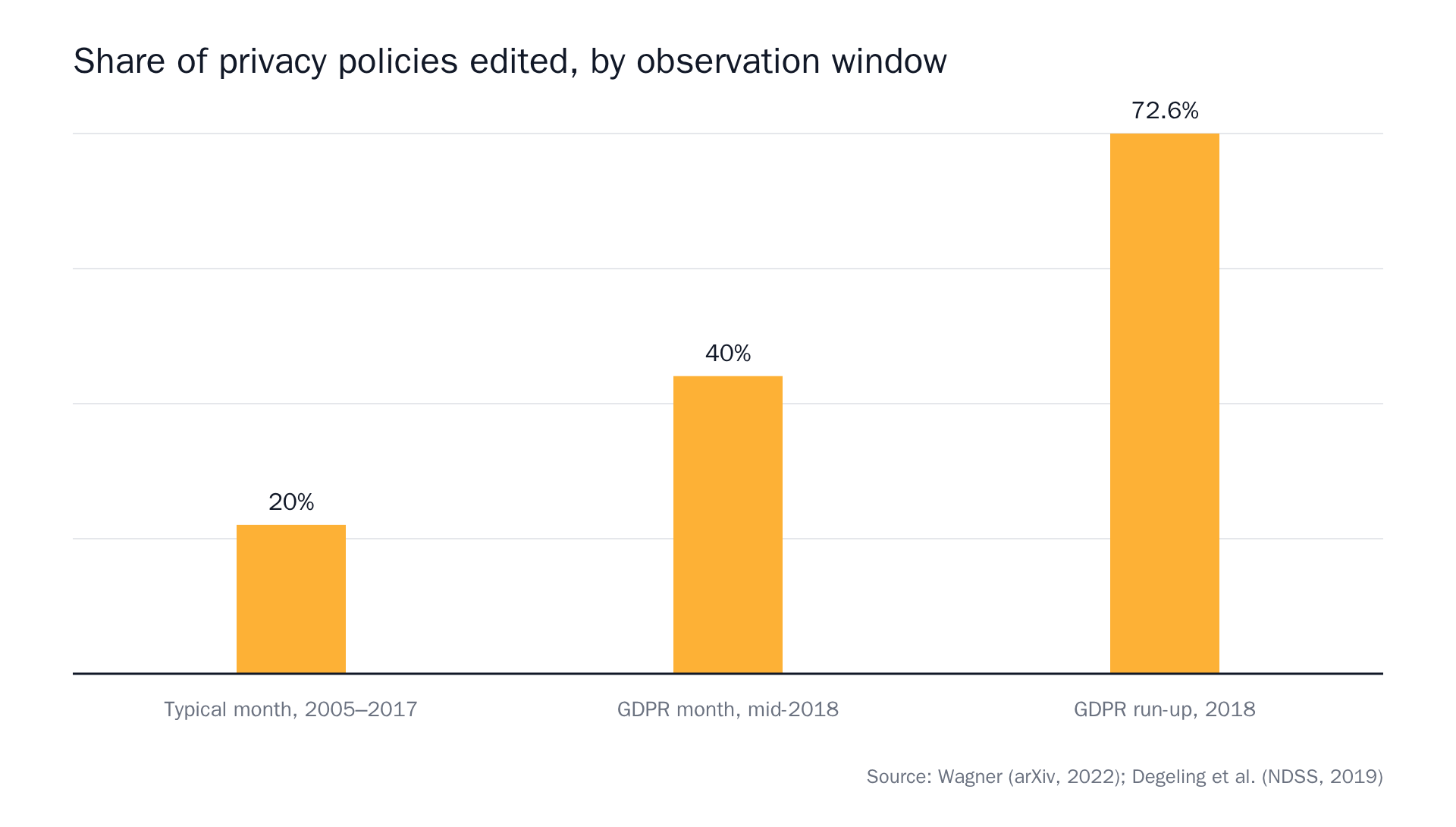 Source: Privacy Policies Across the Ages (1996–2021) and We Value Your Privacy … Now Take Some Cookies.
That profile is the whole argument. A legal page is unchanged in roughly four months out of five. A feed of "items" from it would be empty in a way you can't distinguish from broken. A feed of changes from it is correctly empty, and then one day it isn't.
Why selector-built feeds go quiet without telling you
Every generator in the list-shaped bucket depends on the page's markup staying where it was when you pointed at it. Three things happen, and none of them look like errors.
The markup shifts. A redesign renames .post-list-item to .card, and your feed starts returning valid XML with zero items. Your reader shows no new entries. That's indistinguishable from good news. People lose a quarter this way.
The content isn't in the HTML. Here's the two-minute test: open the raw source and Ctrl-F for a headline you can see on screen. If it isn't in there, the page is client-side rendered (the text arrives after JavaScript runs) and a fetch-and-parse generator will never see it. Roundups mention this as a "doesn't work on JavaScript-heavy sites" caveat and then leave it there, so we wrote up what happens when a page doesn't exist until JavaScript runs it separately.
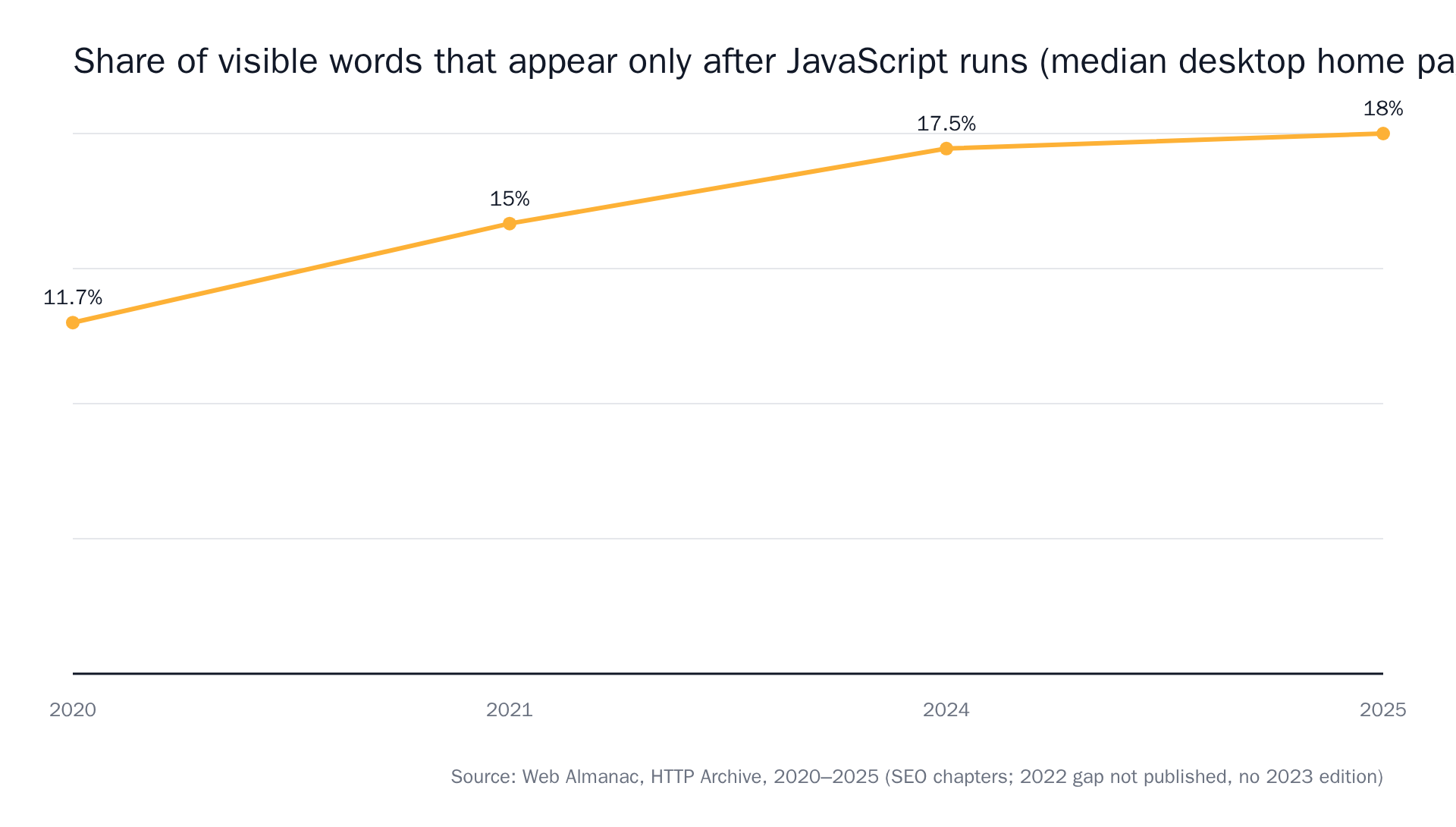 Source: HTTP Archive Web Almanac, SEO chapters 2020–2025.
The guid is unstable. Scraped feeds often synthesise item IDs from position or from the title text. Re-order the list or fix a typo in a headline and the same item fires again. The RSS 2.0 specification is clear that guid is meant to be a string that uniquely identifies the item; a generator that can't produce a stable one will duplicate.
None of the three throws an error. The feed just goes quiet and stays valid.
What a change-shaped feed entry should contain
Our bar for an alert is the same regardless of channel: you should be able to forward it, or paste it into a ticket, without anyone reopening the page. A feed entry gets the same contents as the email and the Slack message.
- One sentence saying what changed. "Standard plan moved from $12 to $15 per seat," not "Pricing."
- Before and after, either as excerpts or, on the exact-diff tier, as a unified diff (a line-by-line comparison showing exactly which text was removed and added).
- A confidence score on the AI tiers. That's the model's own uncertainty, surfaced rather than hidden.
- A full-page screenshot of the page as checked, on the browser-agent tier.
- A link to the monitor timeline, which holds the full change history and is the source of truth. The feed is a copy of it.
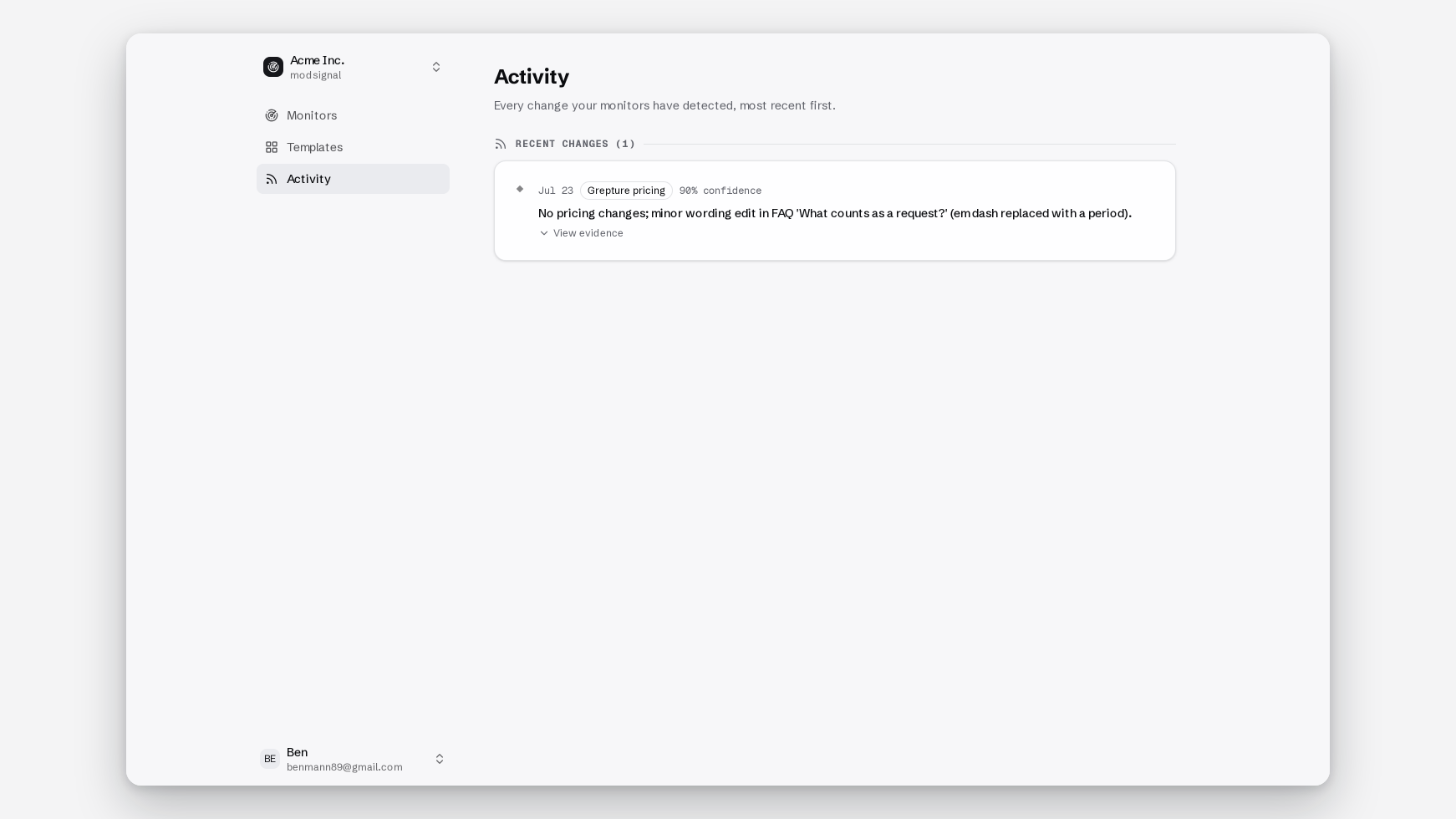
From page to feed in four steps
1. Describe the change, not the page region
You write one plain-language sentence. No CSS selectors, no regex, nothing that a redesign can break.
Alert me if anything on this page changes.
That's a selector with extra steps. Try:
Alert me if a subprocessor is added or removed from the table, if a hosting region changes, or if the notice period for changes is shortened.
The prompt is the definition of "changed" for that page. If you want the longer version of this, we have a whole post on writing a prompt that knows the difference between "the page changed" and "the thing I care about changed".
2. Pick the tier the page deserves
For state-shaped pages, start with exact diff. Byte-for-byte text comparison against the last snapshot, no AI call, unified diff as the evidence. On a DPA or a subprocessor list, every change is signal, so judgment is a liability. Use semantic where the wording moves but only some meaning matters: pricing pages with rotating badges, changelogs, status pages. Use the browser agent when the raw-source test in the section above failed, or when the content sits behind a cookie banner or a tab. Full rundown of the three tiers here. It's a dropdown per monitor, not a migration.
3. Turn on the RSS channel
Settings → Notifications. You get an RSS 2.0 feed whose URL contains a secret token, so it isn't guessable and doesn't need to be public.
One limit, stated plainly: the feed is per team, not per monitor. Every change event your team's monitors produce lands in the same feed. If you need one feed per source, this isn't that, and you'd want the signed webhook or the API instead.
4. Match the cadence to the page
Daily is right for a DPA. Fifteen minutes is right for competitor pricing. Two minutes is for ticket drops. Free is $0 for 3 monitors on daily checks with exact diff and semantic (no browser agent, no card). Pro is $25/mo for 25 monitors at 15 minutes. Scale is $49/mo for 100 at 5 minutes, Business $99/mo for 500 at 2 minutes. Checks themselves are never metered. You pay for reach, not per check.
Make the silence trustworthy
An empty feed should be provable, not assumed. Two things do that work.
The timeline shows every run, not just the ones that found something, so "nothing changed" has a timestamp on it. And signed webhooks emit run_completed heartbeats alongside change_events, so if you're wiring the feed into anything automated you can tell "quiet" apart from "dead."
Auditors love a documented non-event.
Choose something else if…
- Your page is list-shaped. Use RSS-Bridge or RSSHub if you'll self-host, RSS.app or Feedly's RSS Builder if you won't. An item per post is a real job and we don't do it.
- You want the article body in the feed. Full-text tools like FiveFilters' Feed Creator exist for exactly that. We put the change in the entry body, not the post.
- You already live in Feedly. Their RSS Builder is point-and-click inside the reader, though it needs Pro+ (per their plan docs; third-party trackers report Pro+ around $12.99/mo, so check their pricing page).
- You need dozens of cheap list feeds. RSS.app's free tier is 2 feeds refreshed every 24 hours; Basic runs $8.32/mo annual for 15 feeds at 60-minute refresh, Developer $16.64/mo for 100 feeds at 15 minutes with webhooks. Verified against their public pricing page in August 2026. Check their site for current numbers.
The thing to watch on any of these is what's metered. Refresh rate is the usual lever, and a 24-hour refresh on a ticket page is a feed that tells you about the sellout tomorrow.
If your feedless page is a vendor's legal page, the subprocessor monitoring guide has the prompts and the GDPR Article 28 mechanics. Otherwise: free plan, three monitors, daily checks, no card, and the RSS channel is on it.